
In a high-stakes operational environment, an IT incident-whether a system outage, data breach, or performance degradation-can halt progress instantly. For organizations like non-profits and small medical practices, the impact is immediate and severe, directly affecting patient care, donor relations, grant deadlines, and overall productivity. Relying on outdated, fragmented approaches to incident management is a significant risk that modern teams cannot afford. The ad-hoc emails, frantic text messages, and manual tracking spreadsheets that once sufficed are no longer enough to manage complex, interconnected systems effectively. This reactive posture leads to longer resolution times, repeated errors, and team burnout, ultimately undermining an organization's mission.
This guide provides a prioritized, actionable roundup of the 10 most critical it incident management best practices designed for today's operational realities. We will move beyond theory and focus on practical, repeatable processes that create a resilient and efficient response framework. From establishing clear severity levels and automated alerts to conducting blameless post-incident reviews, each practice is a building block for a stronger operational foundation. You will learn how leveraging a unified platform like OpsHub can centralize these efforts, transforming chaotic firefighting into a proactive, controlled, and data-driven system. This approach ensures operational excellence and protects your critical services, even when faced with unexpected challenges and limited resources. Let’s dive into the strategies that will help your team prepare for, respond to, and learn from any IT incident with confidence.
1. Establish a Centralized Incident Management System
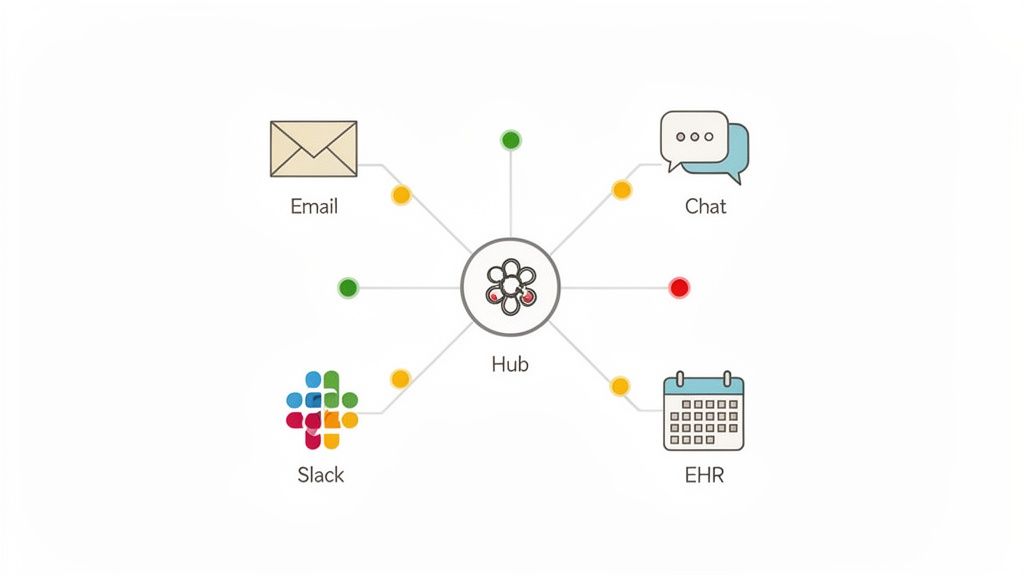
One of the most foundational IT incident management best practices is to create a single source of truth. A centralized system is a unified platform where every IT incident, regardless of its origin, is logged, tracked, and managed through to resolution. This approach eliminates the chaos of siloed reporting, where critical issues might be lost in emails, direct messages, or disparate ticketing tools. By consolidating incident data, organizations gain complete visibility and ensure every problem is accounted for and addressed systematically.
For organizations like small medical practices or non-profits that heavily rely on tools like Google Workspace, a centralized hub prevents critical alerts from falling through the cracks. For example, if an electronic health record (EHR) system goes down, an alert reported via email might be missed, but one logged in a central system immediately triggers a defined workflow. This consolidation is not just about logging tickets; it’s about creating an operational command center that provides a clear, real-time view of your IT environment's health.
Why This Is a Core Practice
Without a central system, response efforts become fragmented and inefficient. Teams waste valuable time trying to identify the scope and owner of an issue, leading to longer downtimes and greater business impact. Centralization streamlines the entire lifecycle, from detection to resolution and review, ensuring consistent processes are followed every time. This is especially vital in regulated environments like healthcare, where auditable records of incident handling are often required.
Actionable Implementation Steps
- Map Existing Workflows: Before implementation, document how incidents are currently reported and handled. Identify all entry points (email, phone, chat) and map them to your new centralized platform.
- Start with a Pilot: Roll out the system to a single department or a small, cross-functional team first. Use their feedback to refine processes, templates, and notification rules before a full organizational launch.
- Establish Clear Conventions: Create and enforce strict naming conventions and categorization for incidents. This ensures data is clean, searchable, and useful for later analysis and trend identification. A healthcare practice might categorize incidents by impact, such as "Patient-Facing System Down" or "Internal Admin Tool Glitch."
- Automate Critical Alerts: Configure the system to automatically create high-priority tickets and notify the on-call team for incidents originating from critical infrastructure, such as a server outage or a security alert. Platforms like OpsHub excel at this by integrating disparate tools into a single, automated workflow.
2. Define Clear Incident Severity and Priority Levels
Not all incidents are created equal, and treating them as such leads to resource misallocation and burnout. A core component of IT incident management best practices is establishing a standardized framework that categorizes incidents based on business impact and urgency. This ensures that the most critical issues receive immediate attention while less severe problems are handled appropriately, without causing unnecessary alarm or pulling teams away from strategic work.
This framework is the bedrock of an effective response strategy. For a non-profit, a system that prevents online donations is a critical, P1-level incident requiring an all-hands-on-deck response. In contrast, a single user’s printer issue is a low-priority ticket. For a med spa, a failure in the appointment booking system is a business-halting emergency, while a glitch in an internal reporting tool is far less urgent. A clear classification system removes ambiguity and empowers teams to act decisively.

Why This Is a Core Practice
Without a defined severity and priority matrix, response efforts become subjective and chaotic. Teams may overreact to minor issues or, worse, underestimate the impact of a major one, leading to extended downtime and significant business consequences. This practice, popularized by frameworks like ITIL and standards such as ISO/IEC 20000, provides a common language for discussing impact, ensuring that a "high priority" issue means the same thing to the CEO as it does to the on-call engineer. This alignment is crucial for efficient resource allocation and predictable response times.
Actionable Implementation Steps
- Involve Department Heads: Work with leaders from every department to define what constitutes a critical, high, medium, and low-priority incident for their specific operations. Their input ensures the criteria accurately reflect true business impact.
- Create a Visual Matrix: Develop and distribute a simple decision tree or matrix that helps responders quickly classify an incident. The matrix should cross-reference impact (e.g., number of users affected, financial loss) with urgency (e.g., time-sensitivity, workaround availability).
- Document Concrete Examples: For each severity level, list clear, real-world examples. For instance, a P1 for a medical practice could be "EHR system inaccessible for all clinicians," while a P4 is "A single workstation needs a software update."
- Integrate into Tooling: Configure your incident management platform to require a severity level for every new ticket. Use this classification to automate notifications, escalations, and service level agreement (SLA) timers, ensuring the right people are engaged within the right timeframe.
3. Implement Automated Incident Detection and Alerting
Relying on users to report issues means you are already behind. A proactive approach, another key IT incident management best practice, involves using automated monitoring tools to detect anomalies, performance degradation, and system failures before they impact end-users. This shifts your team from a reactive firefighting mode to a proactive problem-solving state, significantly reducing incident impact and mean time to resolution (MTTR).
For a medical spa, this could be an automated uptime monitor for their online booking system. If the system becomes unresponsive, an alert is triggered instantly, allowing the IT team to address the issue before a potential client abandons their booking. This automation is crucial for resource-constrained organizations, as it reduces the heavy burden of manual system checks and allows small teams to manage complex environments effectively.
Why This Is a Core Practice
Without automated detection, the first sign of trouble often comes from a frustrated user or a significant business disruption. This delayed awareness prolongs downtime and erodes trust in IT services. Automated systems act as a constant, vigilant watch, identifying performance deviations or outright failures the moment they occur. This empowers teams to resolve issues during low-impact maintenance windows instead of scrambling during peak business hours, preserving productivity and customer satisfaction.
Actionable Implementation Steps
- Start with Critical Systems: Begin by implementing monitoring on your most critical services. For a healthcare practice, this would be the Electronic Health Record (EHR) system and patient portal. Expand monitoring to less critical systems over time.
- Establish Data-Driven Thresholds: Set alert thresholds based on historical performance data, not arbitrary numbers. Analyze baseline metrics to understand normal operating ranges and define what constitutes a genuine anomaly that requires intervention.
- Implement Alert Suppression Rules: To combat alert fatigue, create rules to suppress redundant or low-priority notifications. Group related alerts into a single incident to provide context rather than overwhelming your on-call team with noise.
- Review and Refine Regularly: Dedicate time each month to review alert effectiveness. Are you getting too many false positives? Did a real incident get missed? Use this feedback to continuously adjust thresholds and improve the accuracy of your monitoring.
4. Create and Maintain Detailed Incident Response Playbooks
One of the most effective IT incident management best practices is to develop and maintain detailed incident response playbooks. A playbook, also known as a runbook, is a documented, step-by-step guide for responding to specific types of incidents. It serves as a standardized checklist that ensures a consistent, efficient, and thorough response, regardless of who is on call. This practice transforms reactive firefighting into a structured, repeatable process, significantly reducing human error and resolution time.
For organizations like non-profits with high staff turnover or small medical practices with limited IT expertise, playbooks are invaluable. They capture critical institutional knowledge, ensuring that even if a key team member leaves, the procedure for handling a critical system failure remains. For instance, a medical spa can have a playbook for an appointment system outage that details how to notify clients, revert to manual scheduling, and engage the vendor, ensuring business continuity.
Why This Is a Core Practice
Without playbooks, incident response relies heavily on individual expertise and memory, which can be unreliable under pressure. This often leads to inconsistent outcomes, missed steps, and prolonged outages. Playbooks democratize incident response, empowering any team member to act decisively and follow a proven procedure. This structured approach, popularized by frameworks like Google SRE and ITIL, is essential for building a resilient and predictable IT operation.
Actionable Implementation Steps
- Prioritize Critical Services: Start by creating playbooks for your top 5-10 most frequent or highest-impact incident types. A non-profit might prioritize playbooks for a donor portal failure or a phishing attack response.
- Involve Cross-Functional Experts: Collaborate with experienced engineers, support staff, and business stakeholders to draft the playbooks. Their combined expertise ensures the procedures are both technically sound and operationally practical.
- Structure for Clarity: Organize playbooks with clear sections: detection criteria, immediate triage steps, escalation contacts, communication templates, and resolution verification. Include estimated resolution times to manage expectations.
- Test and Refine Regularly: Don’t let playbooks become static documents. Test them through tabletop exercises and review them quarterly or after any major incident. This ensures they remain accurate, relevant, and effective. Platforms like PagerDuty offer tools to help automate and manage these processes.
5. Establish a Formal On-Call Rotation and Escalation Process
Relying on a single IT person or an informal “whoever is available” approach is unsustainable and leads to burnout. One of the most critical IT incident management best practices is establishing a formal on-call rotation with clear escalation paths. This structured system ensures that there is always a designated person responsible for responding to incidents, providing 24/7 coverage without overloading any single team member. It creates a predictable, fair, and reliable response framework.
For organizations that operate outside of standard business hours, like a 24-hour medical practice or a non-profit running weekend fundraising events, this is non-negotiable. If a patient portal crashes overnight, a formal on-call system ensures the issue is immediately addressed by a rested, prepared technician. This structure moves an organization from a reactive, chaotic state to a proactive and managed one, directly supporting business continuity and compliance mandates that require timely incident resolution.
Why This Is a Core Practice
Without a formal on-call schedule, response times become inconsistent, and critical alerts are frequently missed. This leads to extended downtime, frustrated clients, and a high-stress environment for IT staff. A defined rotation and escalation process brings order to incident response, clarifying who is responsible, when they are responsible, and who to contact if they are unavailable. It transforms incident response from a source of anxiety into a manageable, documented operational function.
Actionable Implementation Steps
- Define Clear Service Level Agreements (SLAs): Establish precise timeframes for response and escalation. For example, a high-priority incident must be acknowledged within 15 minutes, or it automatically escalates to the next tier of support.
- Keep Rotations Short and Fair: To prevent burnout, limit on-call shifts to a maximum of one week. Use scheduling tools to ensure the rotation is distributed fairly among team members over time, and review the workload quarterly to make adjustments.
- Document Escalation Paths Explicitly: Create a clear, easily accessible document that outlines the entire escalation chain, from the on-call engineer to the IT manager and even executive leadership. Include contact information and availability for each person in the chain.
- Integrate On-Call Management Tools: Use dedicated platforms like PagerDuty or Opsgenie to automate scheduling, alerting, and escalations. Integrating these tools with your centralized incident management system ensures alerts are routed to the correct on-call person automatically.
6. Implement Rapid Communication and Status Updates During Incidents
Effective technical resolution is only half the battle; transparent, timely communication is the other. One of the most critical IT incident management best practices is establishing clear communication protocols to keep all stakeholders informed. During an outage, silence breeds anxiety and speculation. A structured communication strategy ensures that everyone from internal teams to external clients receives accurate, consistent updates, which builds trust and manages expectations effectively.
For a small medical practice, this could mean proactively notifying patients via text message that the online appointment portal is temporarily down, preventing a flood of confused phone calls. Similarly, a non-profit experiencing an issue with its online donation platform must inform potential donors to avoid losing contributions and damaging its reputation. The goal is to control the narrative and demonstrate that the situation is being actively managed, turning a potential crisis into an opportunity to showcase competence.
Why This Is a Core Practice
Without a clear communication plan, response teams are often bombarded with status requests from leadership, other departments, and frustrated end-users. This distraction pulls valuable resources away from resolving the actual incident. A proactive communication strategy frees up the technical team to focus on the fix, while a designated communicator ensures all stakeholders feel heard and informed. This prevents misinformation from spreading and maintains operational order during a high-stress event.
Actionable Implementation Steps
- Designate a Communications Lead: For any significant incident, assign one person the role of "Communications Lead." This individual is responsible for drafting and sending all updates, ensuring a single, consistent voice.
- Create Pre-approved Templates: Develop templates for different incident types and severity levels. These templates should include placeholders for key information like the issue summary, business impact, and the next expected update time, allowing for rapid deployment.
- Establish a Communication Cadence: Define how frequently updates will be sent based on incident severity. For a critical P1 incident, updates every 15-30 minutes might be necessary, while a lower-priority issue may only require hourly updates.
- Leverage a Central Status Page: Use a tool like Statuspage or integrate a communication feature within a platform like OpsHub to provide a single source of truth for all incident updates. This centralizes information for both internal and external stakeholders, reducing duplicate inquiries.
7. Conduct Regular Post-Incident Reviews and Root Cause Analysis
Resolving an incident is only half the battle; the other half is ensuring it never happens again. This is where post-incident reviews (PIRs) and root cause analysis (RCA) become one of the most crucial IT incident management best practices. This structured process involves dissecting a resolved incident to understand what happened, why it happened, and how to prevent it from recurring. The goal is not to assign blame but to identify systemic weaknesses and drive continuous improvement.
For a med spa, a PIR after a booking system failure can uncover a flaw in a recent software update, leading to better pre-deployment testing. Similarly, a non-profit experiencing a donor data loss incident can use RCA to identify inadequate backup protocols, strengthening their data protection strategy and maintaining stakeholder trust. These reviews transform incidents from disruptive events into valuable learning opportunities.
Why This Is a Core Practice
Without a formal review process, teams are doomed to repeat the same mistakes. Issues that are "fixed" without understanding their root cause are likely to resurface, creating a cycle of reactive firefighting that drains resources and erodes system reliability. A blameless post-mortem culture, popularized by Google's SRE practices, fosters psychological safety, encouraging engineers to openly discuss failures without fear of reprisal. This transparency is the key to uncovering deep-seated process or technology gaps.
Actionable Implementation Steps
- Schedule Promptly: Conduct the PIR within 48-72 hours of incident resolution while the details are still fresh in everyone's minds. Invite all personnel who were involved, from the first responder to the resolving engineer.
- Adopt a Blameless Framework: Explicitly state at the beginning of each review that the focus is on improving systems and processes, not on individual performance. Frame the discussion around "what" and "how," not "who."
- Use a Structured Analysis Method: Employ techniques like the "5 Whys" to dig deeper than surface-level symptoms. Ask "why" repeatedly until you arrive at the fundamental cause of the failure.
- Document and Assign Action Items: Meticulously document the incident timeline, the root cause(s), and lessons learned. Most importantly, create specific, measurable, and achievable action items with clear owners and deadlines to address the identified issues.
8. Maintain Comprehensive Incident Documentation and Knowledge Base
One of the most valuable IT incident management best practices is to build and maintain a single, searchable repository for all incident knowledge. This knowledge base serves as the institutional memory for your IT operations, capturing detailed resolutions, troubleshooting steps, and system configurations. By documenting every incident, you transform reactive problem-solving into a proactive resource that empowers your team to resolve recurring issues faster and more consistently, ensuring critical knowledge doesn't walk out the door when a team member leaves.
For a non-profit reliant on Google Workspace, this could be a detailed guide for troubleshooting common sync issues that prevent staff from accessing shared grant proposals. Similarly, a med spa could document the step-by-step resolution for a recurring glitch in their appointment scheduling software. This living library of solutions prevents teams from reinventing the wheel with every incident, turning past problems into future efficiencies.
Why This Is a Core Practice
Without a formal knowledge base, resolutions are siloed in individual team members' heads or lost in old ticket threads. This forces staff to solve the same problems repeatedly, increasing Mean Time to Resolution (MTTR) and draining valuable resources. A centralized and well-maintained knowledge base democratizes information, accelerates onboarding for new hires, and ensures consistent service delivery, regardless of who is on call.
Actionable Implementation Steps
- Document Every Resolution: Make it a standard operating procedure to document the resolution for every incident, not just major ones. Capture the symptoms, the root cause, and the exact steps taken to fix it.
- Use Consistent Templates and Categories: Create a standardized template for all knowledge base articles. Use clear categories like "EHR Integration," "Network," or "User Permissions" to make information easy to find.
- Incorporate Visual Aids: Use screenshots, diagrams, and even short video clips to illustrate complex steps. A visual decision tree for diagnosing a network outage is far more effective than a block of text.
- Review and Update Regularly: Assign owners to different sections of the knowledge base and schedule quarterly reviews to ensure all documentation is accurate, relevant, and up-to-date.
- Integrate with Your Central Hub: Connect your knowledge base directly to your incident management system. An ops platform can automatically suggest relevant articles when a new ticket is created, putting solutions at your team’s fingertips.
9. Implement Automated Backup and Disaster Recovery Procedures
A proactive approach to incident management involves preparing for the worst-case scenario: catastrophic data loss or system failure. Implementing automated backup and disaster recovery (DR) procedures is a critical IT incident management best practice that acts as a safety net for your organization’s most valuable asset, its data. This practice moves beyond simple data storage to create a resilient operational framework that can withstand major disruptions, from hardware failure to a ransomware attack.
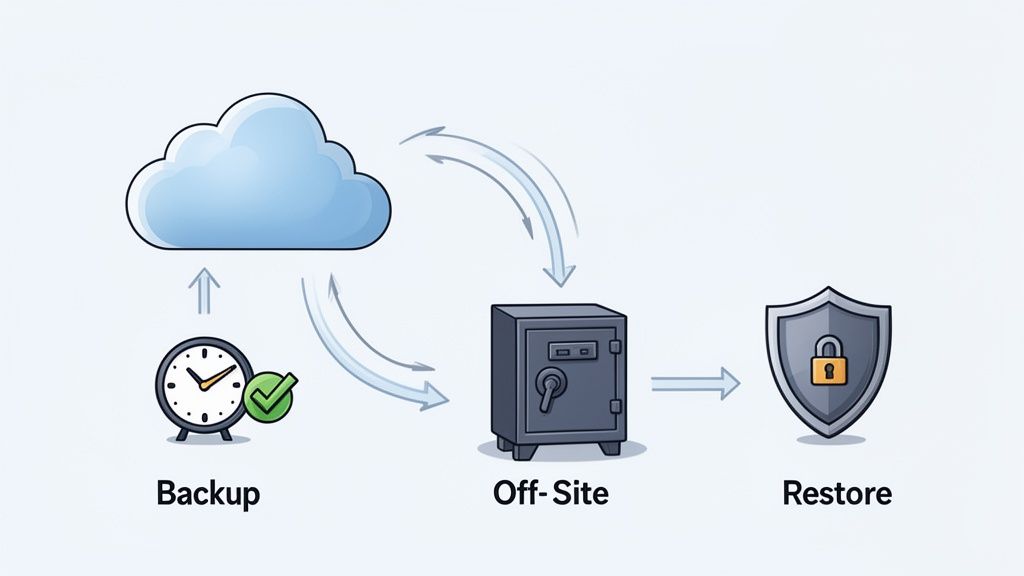
For organizations handling sensitive information, like a medical practice with patient records or a non-profit managing donor data, this is non-negotiable. An automated system ensures that critical data is consistently backed up without manual intervention, while a tested DR plan guarantees you can restore operations swiftly and predictably. For instance, a med spa can leverage automated backups of its booking system to ensure that a server crash doesn't wipe out weeks of appointments, protecting both revenue and client relationships.
Why This Is a Core Practice
Without a robust and tested backup and DR strategy, a single incident can cause irreversible damage. The question is not if a critical system will fail, but when. Relying on manual backups is prone to human error and inconsistency, leaving significant gaps in your data protection. An automated and regularly tested plan minimizes both data loss and downtime, ensuring business continuity and compliance with regulations like HIPAA, which mandates data backup and recoverability.
Actionable Implementation Steps
- Define RTO and RPO: Establish your Recovery Time Objective (RTO), how quickly you need to be back online, and Recovery Point Objective (RPO), the maximum amount of data you can afford to lose. Define these for each critical system.
- Automate Everything: Use tools like Google Cloud Backup and Disaster Recovery or Backblaze to schedule and automate backups. This eliminates manual errors and ensures consistent data protection.
- Test Your Recovery Plan: A backup is useless if it can't be restored. Conduct quarterly DR tests to simulate a failure and walk through the entire recovery process. This validates your procedures and identifies any weaknesses before a real incident occurs.
- Maintain Offline Backups: To protect against ransomware that can encrypt network-attached backups, follow the 3-2-1 rule: three copies of your data, on two different media types, with one copy stored offline or off-site.
- Document and Monitor: Create detailed, step-by-step documentation for your recovery procedures and store it in an accessible location. Continuously monitor backup success rates and set up alerts for any job failures.
10. Establish Continuous Monitoring and Capacity Planning
Reactive incident management is expensive; proactive prevention is strategic. One of the most effective IT incident management best practices is shifting from firefighting to foresight by implementing continuous system monitoring and forward-thinking capacity planning. This involves actively tracking resource utilization and performance metrics to identify potential bottlenecks before they escalate into service-disrupting incidents. By anticipating demand and scaling resources ahead of time, organizations can prevent entire classes of outages caused by resource exhaustion.
For growing organizations like non-profits or medical practices, this proactive stance is crucial for maintaining service reliability during periods of high demand. For instance, a medical practice can monitor its Electronic Health Record (EHR) system's server capacity as flu season approaches, ensuring it can handle the spike in patient data entry. Similarly, a non-profit can track its donor database growth to schedule a system upgrade well before performance degradation impacts a critical fundraising campaign. This approach turns IT management from a reactive cost center into a strategic enabler of organizational growth.
Why This Is a Core Practice
Without continuous monitoring and capacity planning, organizations are perpetually surprised by performance-related failures. These incidents are often the most frustrating because they are entirely preventable. Proactive planning ensures that infrastructure scales gracefully with demand, preventing slowdowns, crashes, and the emergency procurement of resources at a premium. It builds resilience directly into your operations, ensuring systems remain stable even as user load fluctuates.
Actionable Implementation Steps
- Establish Performance Baselines: For every critical system, document its normal operating performance. Measure metrics like CPU usage, memory consumption, and database transaction times during typical and peak periods to define a healthy baseline.
- Set Proactive Alert Thresholds: Configure your monitoring tools to trigger alerts when resource utilization reaches a predefined threshold, such as 70-80% capacity. This gives your team ample time to react before performance is impacted.
- Forecast Future Needs with Historical Data: Review capacity trends quarterly or semi-annually. Use this historical data to forecast seasonal needs or growth-related demands, planning infrastructure upgrades at least one quarter in advance.
- Integrate Planning with Budgeting: Align your capacity planning reviews with your IT budgeting cycles. This ensures that the financial resources needed for hardware upgrades or increased cloud service tiers are approved and available when required. Platforms like Datadog provide the visibility needed to make these data-driven financial and operational decisions.
Top 10 IT Incident Management Best Practices Comparison
| Approach | Implementation Complexity 🔄 | Resource Requirements ⚡ | Expected Outcomes ⭐ / 📊 | Ideal Use Cases 📊 | Key Advantages 💡 |
|---|---|---|---|---|---|
| Establish a Centralized Incident Management System | 🔄 Medium–High: platform setup + integrations | ⚡ Moderate: tooling costs, integration & training | ⭐⭐⭐⭐ · 📊 Unified visibility; reduced MTTR | 📊 Orgs with multiple tools (non‑profits, small medical practices) | 💡 Single source of truth; audit trails; fewer duplicate efforts |
| Define Clear Incident Severity and Priority Levels | 🔄 Low–Medium: policy design & calibration | ⚡ Low: workshops, documentation, training | ⭐⭐⭐⭐ · 📊 Consistent triage; faster escalation | 📊 All orgs needing clear triage (healthcare/non‑profits) | 💡 Clear SLAs & escalation; reduces ambiguity |
| Implement Automated Incident Detection and Alerting | 🔄 Medium: monitoring, tuning, AI configuration | ⚡ Moderate: monitoring tools, setup time | ⭐⭐⭐⭐⭐ · 📊 Early detection; lower user impact | 📊 Orgs lacking 24/7 staff; critical system monitoring | 💡 Proactive alerts; supports 24/7 ops with less staffing |
| Create and Maintain Detailed Incident Response Playbooks | 🔄 Medium: authoring, testing, updates | ⚡ Low–Moderate: staff time to create & review | ⭐⭐⭐⭐ · 📊 Faster, consistent responses; preserved knowledge | 📊 High turnover teams; small IT staffs | 💡 Step‑by‑step guidance; aids onboarding and calm response |
| Establish a Formal On‑Call Rotation and Escalation Process | 🔄 Medium: scheduling, policy & escalation setup | ⚡ Moderate: staffing, compensation, backup planning | ⭐⭐⭐⭐ · 📊 24/7 coverage; clear accountability | 📊 24/7 operations (healthcare, larger non‑profits) | 💡 Prevents single points of failure; reduces burnout via rotation |
| Implement Rapid Communication and Status Updates During Incidents | 🔄 Low–Medium: templates, channels, roles | ⚡ Low: comms owner and integrated tools | ⭐⭐⭐⭐ · 📊 Improved stakeholder trust; fewer support tickets | 📊 Client/patient/donor‑facing orgs | 💡 Reduces misinformation; maintains transparency |
| Conduct Regular Post‑Incident Reviews and Root Cause Analysis | 🔄 Medium: facilitation, analysis, follow‑up | ⚡ Moderate: time for review and action tracking | ⭐⭐⭐⭐⭐ · 📊 Prevents recurrence; drives continuous improvement | 📊 All orgs, critical for healthcare compliance | 💡 Identifies systemic causes; enforces corrective actions |
| Maintain Comprehensive Incident Documentation and Knowledge Base | 🔄 Low–Medium: structure, governance, updates | ⚡ Low–Moderate: ongoing documentation effort | ⭐⭐⭐⭐ · 📊 Reduced MTTR; better onboarding | 📊 Teams with turnover; limited IT staff | 💡 Searchable solutions; preserves institutional memory |
| Implement Automated Backup and Disaster Recovery Procedures | 🔄 Medium–High: design, encryption, testing | ⚡ High: storage, replication, testing resources | ⭐⭐⭐⭐⭐ · 📊 Minimized data loss; faster recovery; compliance | 📊 Healthcare & data‑sensitive organizations | 💡 Ensures recoverability; meets regulatory requirements |
| Establish Continuous Monitoring and Capacity Planning | 🔄 Medium: metrics, baselines, forecasting | ⚡ Moderate: monitoring tools and analytics expertise | ⭐⭐⭐⭐ · 📊 Prevents capacity outages; optimizes costs | 📊 Growing orgs that must scale predictably | 💡 Forecast demand; right‑size infrastructure to needs |
Unifying Your Incident Management for Effortless Operations
Navigating the landscape of IT incident management can feel like orchestrating a complex symphony. Each instrument, from automated alerting to post-incident reviews, must play its part in perfect harmony. Throughout this guide, we've explored the ten fundamental IT incident management best practices that form the score for this symphony. We've moved beyond abstract theory, providing a blueprint for establishing a centralized system, defining clear severity levels, and creating actionable response playbooks.
The core message is not simply to adopt these practices in isolation. True operational resilience is achieved when these elements are woven into a single, cohesive fabric. Implementing a formal on-call rotation is effective, but its power multiplies when integrated with automated alerting and detailed playbooks. Similarly, a post-incident review is only valuable if its findings are captured in a comprehensive knowledge base and used to refine future responses. This interconnectedness is the foundation of a mature incident management strategy.
From Reactive Firefighting to Proactive Resilience
For organizations like non-profits and small medical practices, where every resource is critical, shifting from a reactive to a proactive posture is not a luxury; it is a necessity. Adopting these best practices systematically transforms your team from digital firefighters, constantly battling unexpected blazes, into strategic guardians of your infrastructure.
This transformation creates a powerful ripple effect across your organization:
- Reduced Downtime: By detecting issues faster and resolving them with predefined playbooks, you significantly minimize the impact on your constituents, clients, or patients.
- Increased Team Morale: Clear roles, defined escalation paths, and automated processes reduce the stress and burnout associated with chaotic, all-hands-on-deck incident responses.
- Enhanced Trust and Credibility: Whether you are handling donor information, patient records, or grant applications, a stable and reliable IT environment builds trust with your stakeholders.
The ultimate goal is to create a system where the process itself drives the resolution. When an incident occurs, your team shouldn't be scrambling to figure out who to call or what to do first. The system should guide them, automating communication, pulling relevant data, and providing step-by-step instructions. This frees up your most valuable asset, your people, to focus on complex problem-solving rather than administrative overhead.
Your Path Forward: Building a Unified Command Center
The journey toward mastering these IT incident management best practices is an ongoing process of refinement and integration. The crucial next step is to bridge the gaps between your tools, processes, and people. A fragmented approach, where your monitoring tools, communication channels, and documentation live in separate silos, will always undermine your efforts.
The key is unification. This is where a modern operational platform becomes indispensable. Instead of juggling multiple disconnected systems, you can create a single command center that orchestrates the entire incident lifecycle. This unified hub connects your monitoring alerts, triggers the correct playbooks, notifies the right on-call personnel, and centralizes all communication and documentation. By doing so, you embed these best practices directly into your daily workflow, making resilience a built-in feature of your operations, not an afterthought. This allows your team to focus on what truly matters: serving your community and advancing your mission with the confidence that your technology is a stable and supportive foundation.
Ready to transform your incident management from a scattered checklist into a unified, automated powerhouse? See how OpsHub can bring all these best practices together under one roof, simplifying your operations and empowering your team. Explore the platform designed for modern teams at OpsHub.
Share This Story, Choose Your Platform!
TUNE IN

OpsHub Signal publishes analysis, essays, and field notes on operations, capital, policy, and systems design. Subscribe to receive a weekly briefing that cuts through noise and delivers what actually matters to operators.