

Choosing from the best task management apps for teams is more than just picking a tool; it's about selecting a central nervous system for your team's productivity. With distributed teams and complex project scopes becoming standard, the right platform is the critical difference between seamless execution and chaotic firefighting. The challenge isn't a lack of options, but rather an overabundance of them, each claiming to be the definitive solution.
This guide cuts through the noise. It provides actionable insights and a comprehensive analysis of the top platforms available, moving beyond generic feature lists to give you practical scenarios and an honest assessment of limitations. We will dissect how leading tools, from comprehensive platforms like Asana and monday.com to flexible workspaces like Notion and Airtable, can fit into your organization's unique workflow. For each application, we provide screenshots, direct links, and a detailed breakdown covering:
- Core Features and Differentiators: What makes each platform stand out.
- Ideal Team Size and Use Case: Who the tool is truly built for.
- AI and Automation Capabilities: How it leverages modern tech to boost efficiency.
- Pricing Tiers and Value: A clear look at the investment required.
- Security and Compliance: Key considerations for enterprise and regulated industries.
Our goal is to equip COOs, IT leaders, and executives with the specific information needed to make a strategic decision that drives tangible results. While many powerful solutions come with a significant cost, budget constraints don't have to be a roadblock. To help in your selection process, a comprehensive review of the 12 Best Free Task Management Tools for Teams in 2025 could provide valuable insights into budget-friendly options. Let’s dive into the paid solutions that lead the market.
1. Asana
Asana is a highly mature and scalable platform that excels at coordinating complex, cross-functional projects. It stands out as one of the best task management apps for teams by moving beyond simple to-do lists into a comprehensive work management system. Instead of tracking tasks in isolation, teams use Asana's List, Board, Timeline (Gantt), and Calendar views to visualize how individual work connects to larger project dependencies and strategic goals.
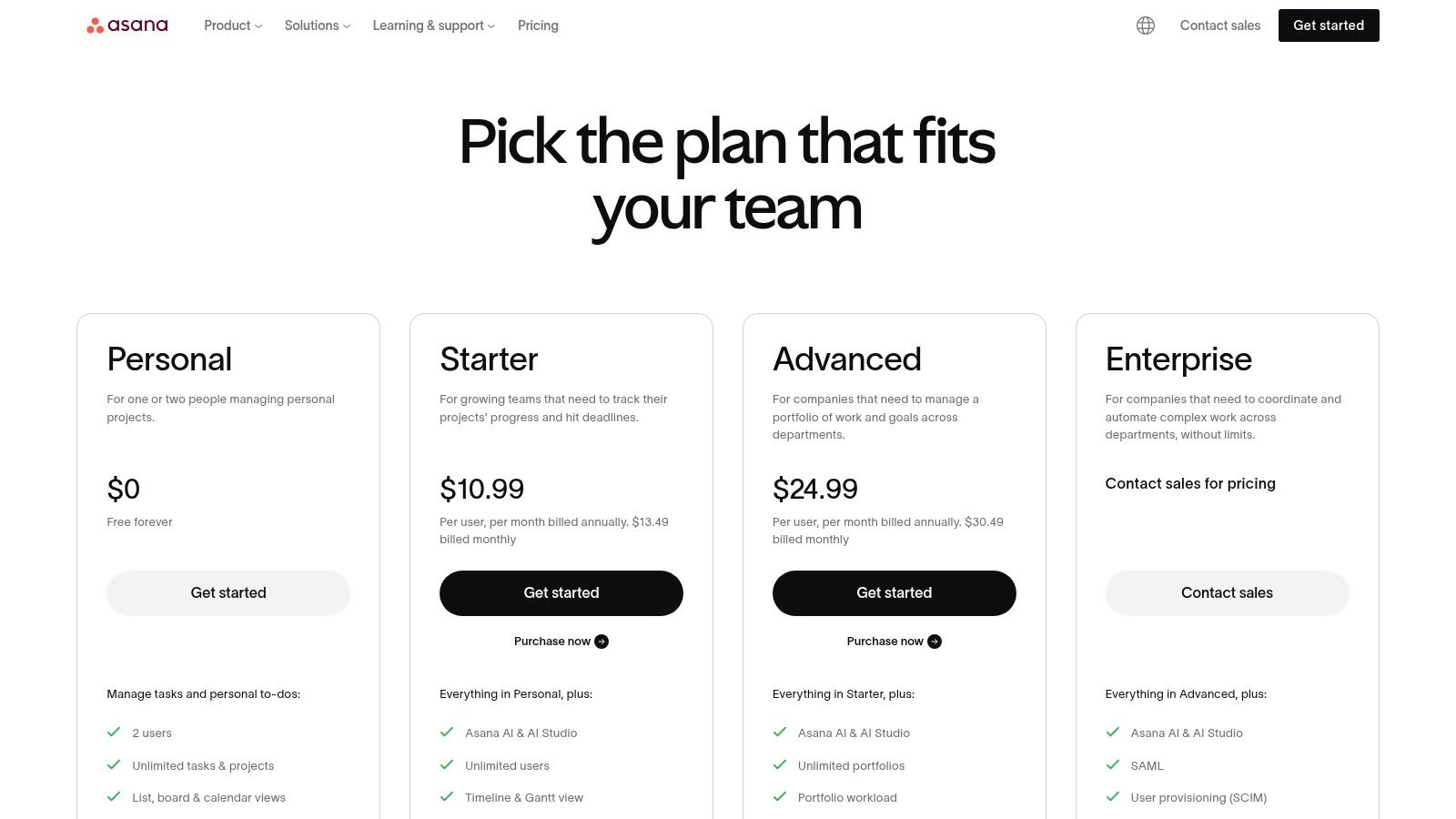
Its core strength lies in providing clarity and accountability across an organization. Practically, this means leadership can use Portfolios to get a real-time health check on key initiatives, drilling down from a high-level goal to the specific task blocking progress. The Workflow Builder automates routine processes, like handoffs between marketing and design, ensuring that standardized steps are followed every time, which is essential for achieving operational excellence.
Key Considerations for Asana
- Best For: Mid-sized to large organizations managing multiple complex projects, marketing campaigns, product launches, or company-wide OKRs.
- Google Workspace Integration: Deeply integrates with Gmail, Google Drive, and Calendar, allowing users to create tasks from emails and attach files seamlessly.
- AI & Automation: Asana AI helps draft status updates, generate project plans, and provide smart suggestions. Paid plans offer extensive custom automation rules.
- Pricing: Starts with a free "Personal" plan for individuals. Paid team plans include Starter (from $10.99/user/month) and Advanced (from $24.99/user/month), with Enterprise options for advanced security and governance.
| Pros | Cons |
|---|---|
| Excellent for dependency and portfolio management | Can be overly complex for very small teams or simple tasks |
| Extensive third-party app ecosystem | Key features are locked behind higher-priced tiers |
| Strong security, admin controls, and guest access options | The user interface can feel overwhelming for new users |
2. monday.com Work Management
monday.com is a vibrant and highly visual Work OS that empowers teams to manage everything from simple tasks to complex project portfolios in a single, flexible space. It’s one of the best task management apps for teams that prioritize customization and visibility, allowing users to build custom workflows with colorful, intuitive building blocks. A practical example is a marketing team building a campaign board where columns track budget, status, channel, and target audience, all visible in a single glance.
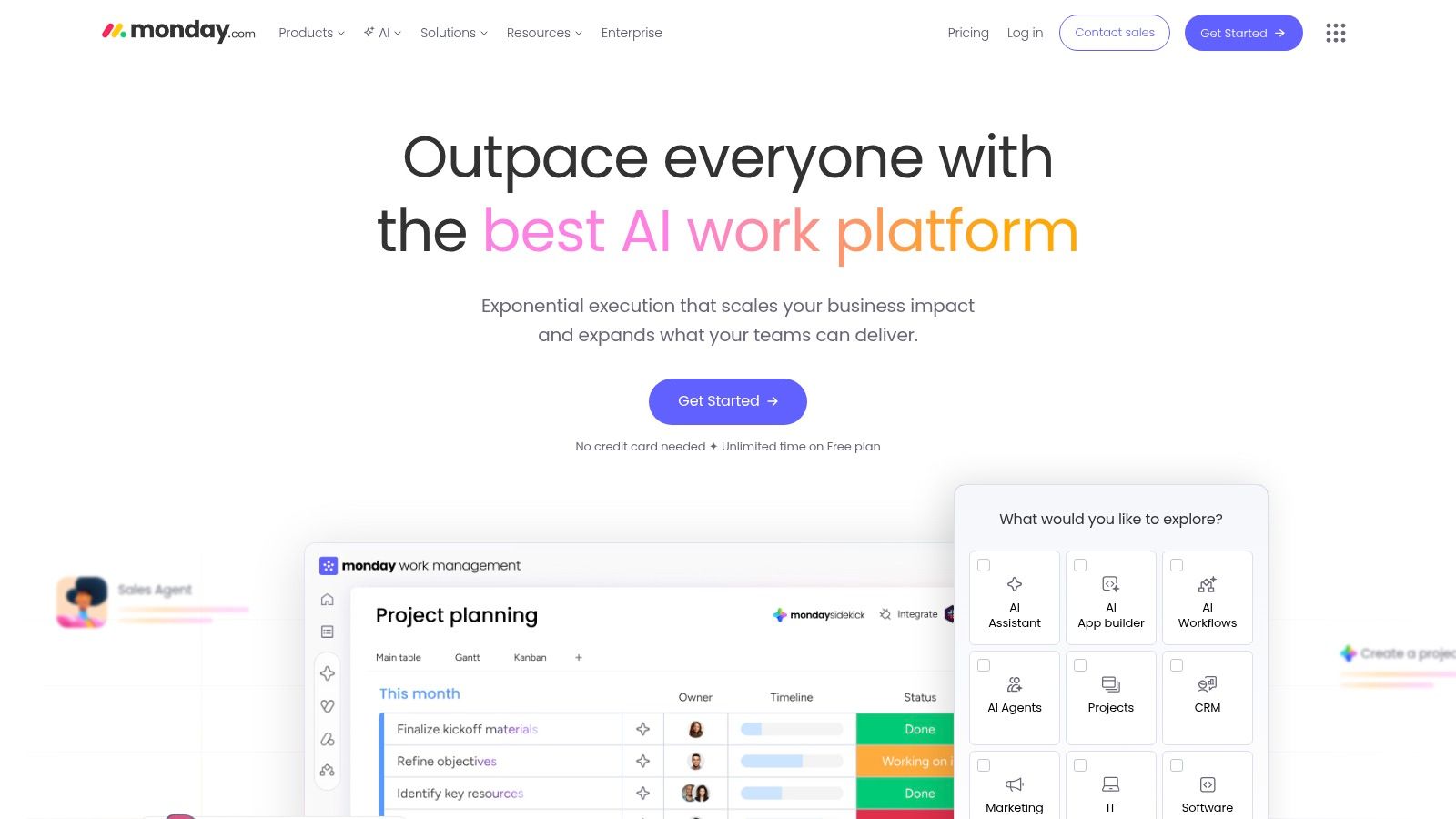
The platform’s core strength is its powerful combination of a customizable data model and user-friendly interface. Customizable dashboards pull data from multiple boards, giving leaders a real-time, high-level overview of progress and potential bottlenecks. For teams ready to adopt this platform, external support can be invaluable, with specialized services available for smooth monday.com implementation services. The built-in automations are also crucial for reducing manual work, such as automatically notifying a manager when a task's status changes to "Done" or creating a recurring task for weekly reports. This is key to enabling various intelligent automation use cases.
Key Considerations for monday.com
- Best For: Mid-market teams in creative, marketing, and sales departments that require a visually engaging platform with powerful reporting and customization.
- Google Workspace Integration: Connects with Gmail to send email updates and with Google Calendar to sync deadlines. Google Drive integration allows for easy file attachment to tasks.
- AI & Automation: Offers an AI Assistant to help generate tasks, summarize notes, and compose emails. Automation and integration "actions" are metered, with quotas increasing on higher-tier plans.
- Pricing: A free plan is available for up to 2 users. Paid plans start with Basic ($9/user/month), Standard ($12/user/month), and Pro ($19/user/month), with custom pricing for Enterprise. Note that paid plans have seat minimums.
| Pros | Cons |
|---|---|
| Highly customizable data model and templates | Pricing scales by seat minimums and action quotas can limit usage |
| Good balance of usability and power for mid-market teams | Multiple monday products can add evaluation complexity |
| Strong admin and visibility controls | Core features like time tracking are on higher-tier plans |
3. ClickUp
ClickUp positions itself as an all-in-one work hub designed to replace multiple disparate applications. It combines tasks, docs, goals, whiteboards, and time tracking into a single, highly customizable platform. This makes it one of the best task management apps for teams aiming to consolidate their tech stack and reduce context switching. For example, a team can plan a project on a whiteboard, break it down into tasks, write the project brief in a ClickUp Doc, and track time against each task, all without leaving the app.
The platform’s strength lies in its hierarchical structure ("Spaces" > "Folders" > "Lists") and rich task views, including List, Board, Calendar, and Gantt charts. This flexibility empowers teams to visualize work in whatever format best suits their process, from agile sprints to long-term roadmaps. ClickUp's powerful customization, including custom fields for things like budget codes or client IDs, allows it to adapt to nearly any workflow. For those just starting their search, it serves as a strong contender in the landscape of project management software for small teams.
Key Considerations for ClickUp
- Best For: Fast-growing startups and mid-sized teams that need a highly customizable, all-in-one solution to manage diverse types of work and consolidate tools.
- Google Workspace Integration: Connects with Google Drive, Calendar, and Gmail, enabling users to link documents, sync events, and manage tasks directly from their inbox.
- AI & Automation: ClickUp AI is available across all plans via purchasable "Super Credits," assisting with writing, summarizing content, and generating task templates. Automation is robust on paid plans.
- Pricing: Offers a generous free plan. Paid tiers include Unlimited (from $7/user/month), Business (from $12/user/month), and a custom-priced Enterprise plan.
| Pros | Cons |
|---|---|
| Aggressive feature depth at lower price points | Breadth of features can introduce setup complexity |
| Good consolidation of multiple collaboration tools | AI credits are an extra cost for heavy usage |
| 24/7 support and strong automation capabilities | The interface may feel busy or overwhelming for new users |
4. Trello (Atlassian)
Trello is the quintessential Kanban-style task management app, renowned for its simple, visual, and highly intuitive interface based on boards, lists, and cards. Its core strength lies in its rapid adoption rate; a new team can set up a board and start dragging and dropping task cards between "To Do," "In Progress," and "Done" lists in minutes. This makes it an exceptional choice for managing linear processes like a content creation pipeline or a simple sales funnel where visualizing the flow of work is the main goal.
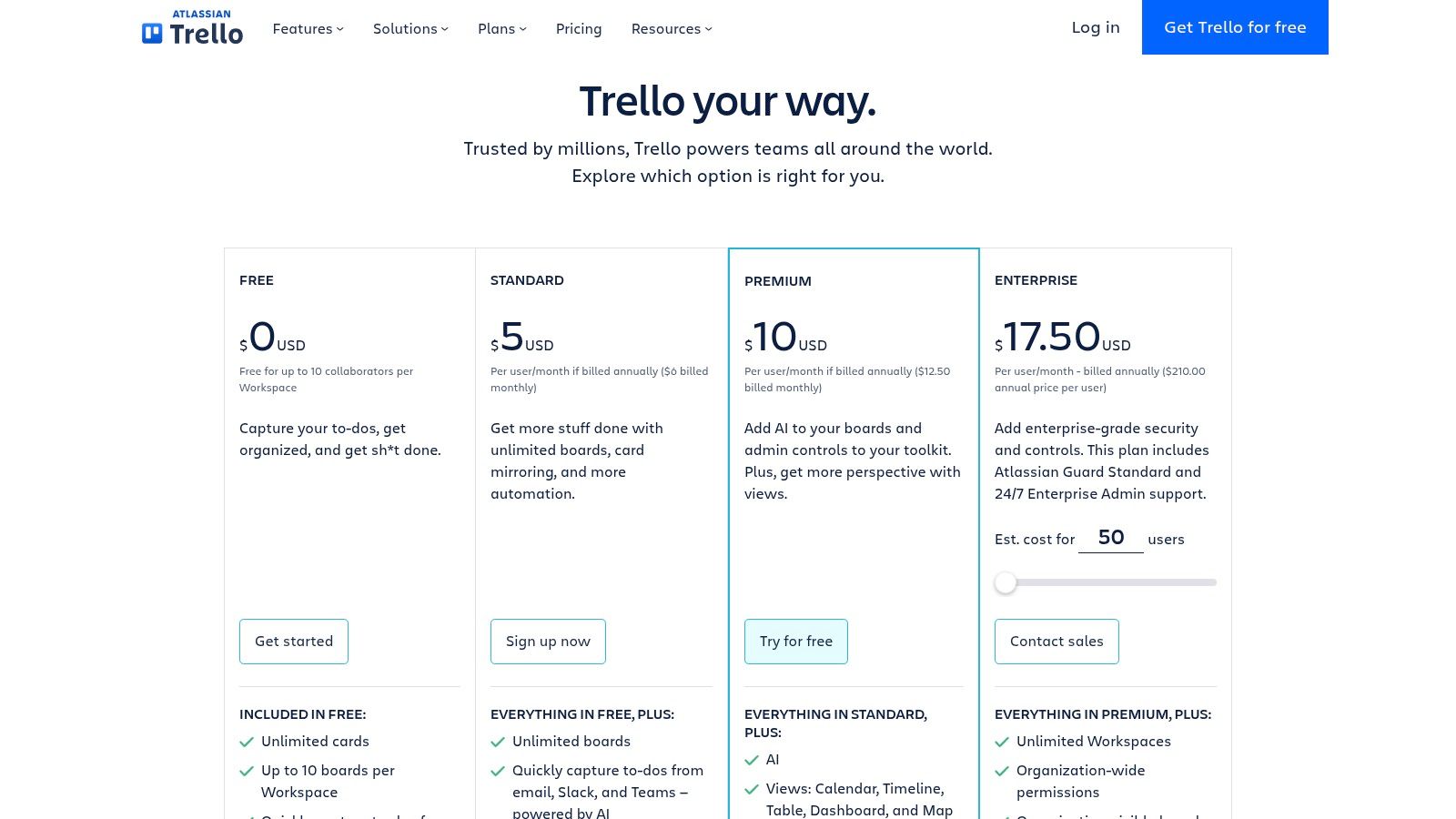
While its simplicity is its main draw, Trello scales with powerful features beneath the surface. Butler, its built-in automation engine, lets you create practical rules like, "When a card is moved to the 'Review' list, add the manager as a member and set a due date for 24 hours from now." For growing teams, Premium and Enterprise tiers unlock additional views like Calendar, Timeline, and Dashboard, providing more sophisticated ways to track progress and manage resources across multiple boards.
Key Considerations for Trello
- Best For: Small to mid-sized teams, marketing departments, startups, and cross-functional groups that need a highly visual and easy-to-adopt tool for managing distinct projects and workflows.
- Google Workspace Integration: Integrates smoothly with Google Drive for attaching files and Google Calendar for syncing due dates, helping teams stay connected within their existing ecosystem.
- AI & Automation: Atlassian Intelligence is being integrated to help summarize card comments and generate task descriptions. The powerful Butler automation is a core feature available on all plans, with expanded limits on paid tiers.
- Pricing: Offers a generous free plan. Paid tiers include Standard (from $5/user/month), Premium (from $10/user/month) for more views and admin controls, and Enterprise (from $17.50/user/month) for advanced security.
| Pros | Cons |
|---|---|
| Extremely intuitive and fast for new teams to adopt | May be too simplistic for highly complex, multi-layered projects |
| Affordable pricing makes it accessible for growing teams | Advanced reporting often requires third-party Power-Ups |
| Strong automation (Butler) is included even on free plans | Teams needing deep dependency tracking may prefer other tools |
5. Notion
Notion is a unified workspace that blurs the line between a document editor, a database, and a task manager. It stands out by allowing teams to build their own custom tools, combining process documentation, knowledge bases, and project tracking into a single, interconnected system. For instance, a team can write a project brief, create a task database for execution, and build a public-facing FAQ page from that same database, all within one Notion workspace.
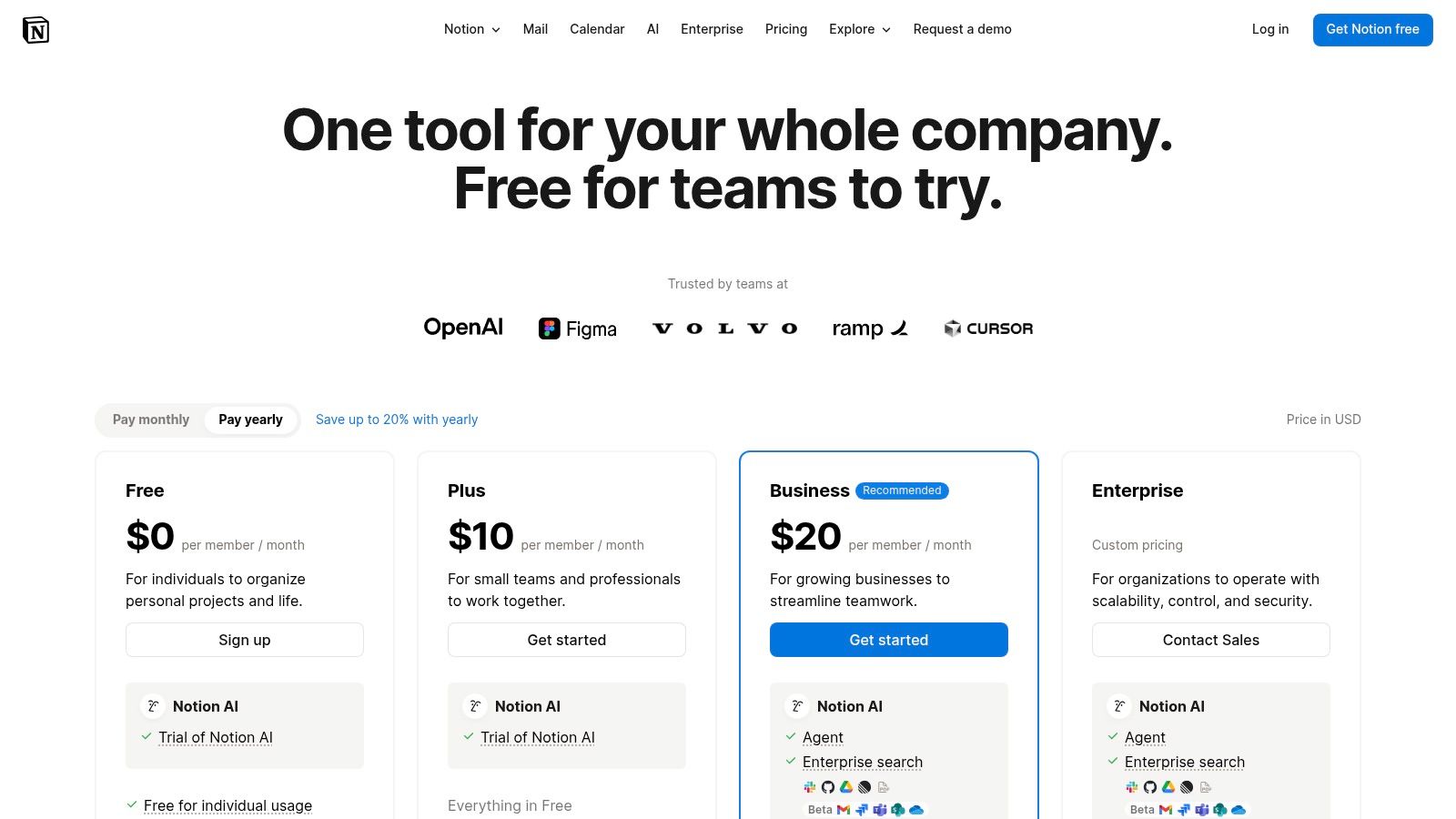
Its core strength lies in its database functionality, which can be configured with multiple views (Board, Timeline, Calendar, List, Gallery) to manage everything from simple to-do lists to complex project roadmaps. A practical use case is linking a "Tasks" database to a "Meeting Notes" database. When a task is mentioned in a meeting, you can link the two, providing instant context for anyone working on that task later. This all-in-one approach is ideal for teams that want to design their workflows from scratch.
Key Considerations for Notion
- Best For: Cross-functional teams that need to heavily integrate project tasks with documentation, wikis, and knowledge management systems.
- Google Workspace Integration: Integrates with Google Drive to embed Docs, Sheets, and Slides. Google Calendar sync is also available, allowing for two-way synchronization of events and database items.
- AI & Automation: Notion AI is deeply embedded, offering content generation, summarization, and task extraction. It also features Q&A, a powerful enterprise search that answers questions based on workspace content.
- Pricing: A free plan is available for individuals. Paid plans include Plus (from $8/user/month), Business (from $15/user/month), and custom Enterprise plans with advanced security and controls.
| Pros | Cons |
|---|---|
| Extremely flexible for combining process, knowledge, and tasks | Requires upfront design to avoid workspace sprawl and chaos |
| Strong value for cross-functional documentation and tracking | Offline support can be limited |
| Flexible building blocks for custom team workflows | Advanced governance and security are on higher-priced tiers |
6. Wrike
Wrike is a robust and highly configurable work management platform designed for teams that require structured workflows, deep customization, and enterprise-grade security. It positions itself as one of the best task management apps for teams by offering a powerful combination of project views, including dynamic Gantt charts, boards, and tables. A professional services team, for example, would use Wrike's custom request forms to standardize client intake and automatically generate a project with predefined tasks and timelines.
Its core advantage lies in its scalability and governance capabilities. Custom workflows with specific status transitions ensure that tasks move through a required approval process, while detailed analytics provide visibility into team performance and resource allocation. Features like Wrike Copilot and its AI bundles also help automate task creation, risk analysis, and report generation, turning raw project data into actionable insights for managers.
Key Considerations for Wrike
- Best For: Mid-market to enterprise organizations, especially professional services firms and marketing departments that require advanced reporting, resource management, and process governance.
- Google Workspace Integration: Offers solid integration with Gmail and Google Drive, allowing users to create tasks from emails, sync calendars, and attach Drive files directly to Wrike tasks.
- AI & Automation: Wrike's AI features, including AI Essentials and AI Elite bundles, provide intelligent automation, risk prediction, and content generation. Its automation engine supports multi-step, conditional rules.
- Pricing: Offers a free plan for basic task management. Paid plans include Team (from $9.80/user/month) and Business (from $24.80/user/month), with Enterprise and Pinnacle tiers for advanced security and analytics.
| Pros | Cons |
|---|---|
| Strong governance, scalability, and rich automation | Pricing tiers and add-ons can be complex to navigate |
| Clear packaging for different organizational sizes | Some advanced features require higher tiers or add-ons |
| Extensive integrations and enterprise controls | User interface can be less intuitive for new users |
7. Smartsheet
Smartsheet leverages a familiar spreadsheet-like interface to deliver powerful, enterprise-grade work management capabilities. It stands out among the best task management apps for teams that need to manage structured, data-driven projects with precision and control. While it looks like a spreadsheet, each row is a task that can have its own attachments, discussions, and automations. Users can switch from the core grid view to Gantt, Card, and Calendar views to visualize the same data differently.
The platform’s strength lies in its scalability and robust feature set for regulated or process-heavy industries. With advanced formulas, conditional formatting, and powerful automations, teams can build sophisticated workflows. For example, a project manager can set up an automation to automatically request an update from a task owner when a due date is approaching, or move a row to an "Archive" sheet once a project is marked "Complete," ensuring a clean and auditable record.
Key Considerations for Smartsheet
- Best For: Operations, IT, and project management offices (PMOs) in mid-sized to enterprise organizations that require a structured, auditable system for managing complex projects and portfolios.
- Google Workspace Integration: Connects with Google Drive to attach files to rows, syncs with Google Calendar, and uses Google Forms to collect data directly into sheets.
- AI & Automation: Offers a robust automation builder for creating rules that trigger actions like alerts, approval requests, and row updates. AI tools are available to help generate formulas and analyze sheet data.
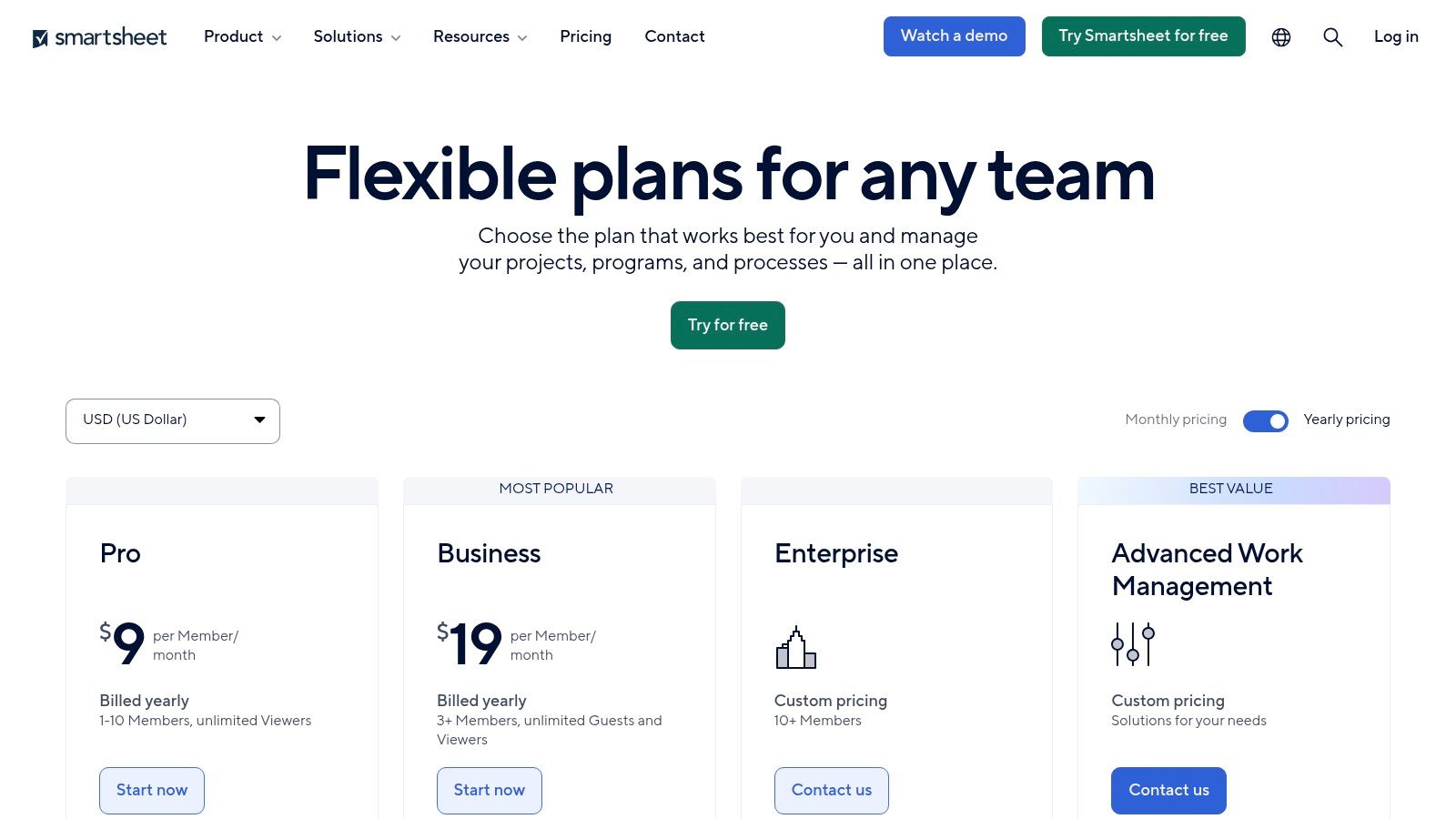
- Pricing: A free plan is available for one user and two editors. Paid plans include Pro (from $7/user/month) and Business (from $25/user/month), with custom pricing for Enterprise needs.
| Pros | Cons |
|---|---|
| Familiar spreadsheet paradigm with enterprise controls | UI can feel heavy compared with lighter task apps |
| Strong portfolio and reporting extensions through add-ons | Best value is at the Business+ tier; key capabilities require paid add-ons |
| Good for structured operational workflows | Steeper learning curve for users not accustomed to spreadsheets |
8. Basecamp
Basecamp offers a distinctly opinionated and simplified approach to project management, positioning itself as an all-in-one toolkit for teams who want to avoid complexity. It consolidates six core tools into every project: a to-do list, a "Card Table" (Kanban board), a message board, a campfire chat, file storage, and a schedule. This structure means a team working on a client project has one predictable place for all discussions, deadlines, and deliverables, reducing the need to jump between Slack, Google Drive, and another task app.
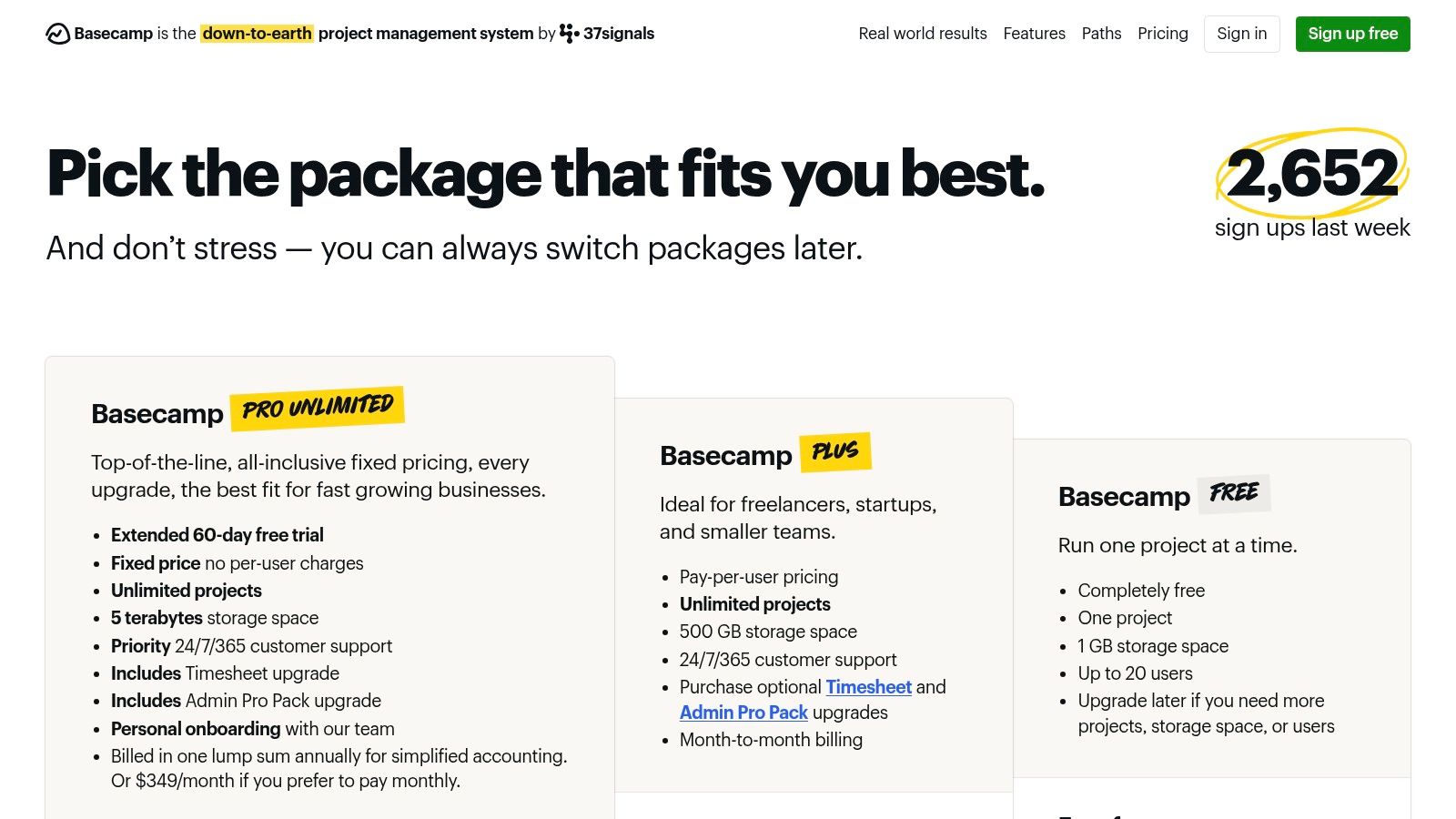
The platform’s strength lies in its simplicity and predictable pricing model. The flat-fee "Pro Unlimited" plan includes unlimited users, making it a cost-effective solution for large teams or agencies that work with many external clients and contractors, who can be added for free. Basecamp’s focused feature set ensures that non-technical stakeholders can understand and use the platform quickly with minimal training.
Key Considerations for Basecamp
- Best For: Agencies, consultancies, and teams of any size seeking a simple, unified platform for client work, internal projects, and asynchronous communication without per-user pricing constraints.
- Google Workspace Integration: Integrates with Google Drive, Docs, Sheets, and Calendar for file attachments and event syncing, though the integrations are less deep than some competitors.
- AI & Automation: Basecamp does not currently offer built-in AI features or advanced, rule-based automation, focusing instead on manual, human-centric workflows.
- Pricing: Offers a free plan for up to 20 users. Paid plans are Basecamp (from $15/user/month) or the all-inclusive Pro Unlimited plan for a flat $299/month for unlimited users.
| Pros | Cons |
|---|---|
| Predictable pricing at scale with the Pro Unlimited plan | Fewer enterprise reporting and governance features |
| Very fast to onboard non-technical stakeholders | Limited advanced automation compared with competitors |
| Simple, focused feature set reduces overhead | Opinionated structure may not suit all workflow types |
9. Microsoft Planner (incl. Planner premium + Project)
Microsoft Planner is a task management application deeply embedded within the Microsoft 365 ecosystem, making it a natural choice for organizations standardized on Microsoft's suite. For a team already using Microsoft Teams for communication, Planner provides a simple, Kanban-style board that can be added as a tab directly within a Teams channel. This allows for task management right alongside conversations, files, and meetings, leveraging existing user accounts and security protocols without adding another standalone app.
This structure makes Planner one of the best task management apps for teams that need to start simple but have a path to greater project management maturity. As needs grow, premium plans bundle Microsoft Project's more advanced capabilities for dependency management, resource allocation, and portfolio oversight. Furthermore, the introduction of Copilot in Planner brings generative AI to assist with goal setting and task breakdown directly within the workflow.
Key Considerations for Microsoft Planner
- Best For: Organizations heavily invested in the Microsoft 365 ecosystem, from small teams needing a basic task board to enterprises requiring robust project and portfolio management.
- Google Workspace Integration: Integration is non-native and limited. This tool is designed for a Microsoft-centric environment and is not a practical choice for teams using Google Workspace.
- AI & Automation: Copilot in Planner (preview) assists in creating and managing plans. Automation is handled through Power Automate, allowing for complex, custom workflows across the M365 suite.
- Pricing: Basic Planner is included with most Microsoft 365 Business and Enterprise plans. Advanced features require paid add-ons like Planner Plan 1 (from $10/user/month) or bundles with Project Plan 3 (from $30/user/month) for portfolio management.
| Pros | Cons |
|---|---|
| Deep integration with Microsoft 365 apps and security | Advanced features require separate, costly Project licenses |
| Straightforward licensing if already using Microsoft 365 | Less intuitive or feature-rich than some standalone competitors |
| Integrated ecosystem reduces extra vendor management | GCC/Government clouds may lag on premium feature rollouts |
10. Airtable
Airtable is a hybrid platform that blends the familiarity of a spreadsheet with the power of a relational database, making it an exceptionally flexible tool for custom task management. It stands out by allowing teams to build their own bespoke applications and workflows. For example, a marketing team can create a "Content" base where one table tracks article ideas, another tracks authors, and a third tracks publication channels. Because these tables are linked, they can instantly see which authors are writing which articles for which channels.
Its core strength is in managing structured, data-driven work. Teams can use Airtable's interface designer to create an intuitive intake form for marketing requests, which populates a "Requests" table. From there, an automation can be triggered to assign the request to a team member and update its status. This makes it one of the best task management apps for teams that need to connect their tasks directly to underlying data sets, like client records or product inventories.
Key Considerations for Airtable
- Best For: Teams that need a highly customizable platform for managing structured data alongside tasks, such as creative agencies, operations teams, and marketing departments.
- Google Workspace Integration: Connects with Google Calendar for two-way sync, Google Drive for file attachments, and Gmail to trigger automations or send notifications.
- AI & Automation: Airtable AI is built into the platform, allowing users to summarize text, categorize information, and generate content within their workflows. Paid plans include a generous allocation of automation runs and AI credits.
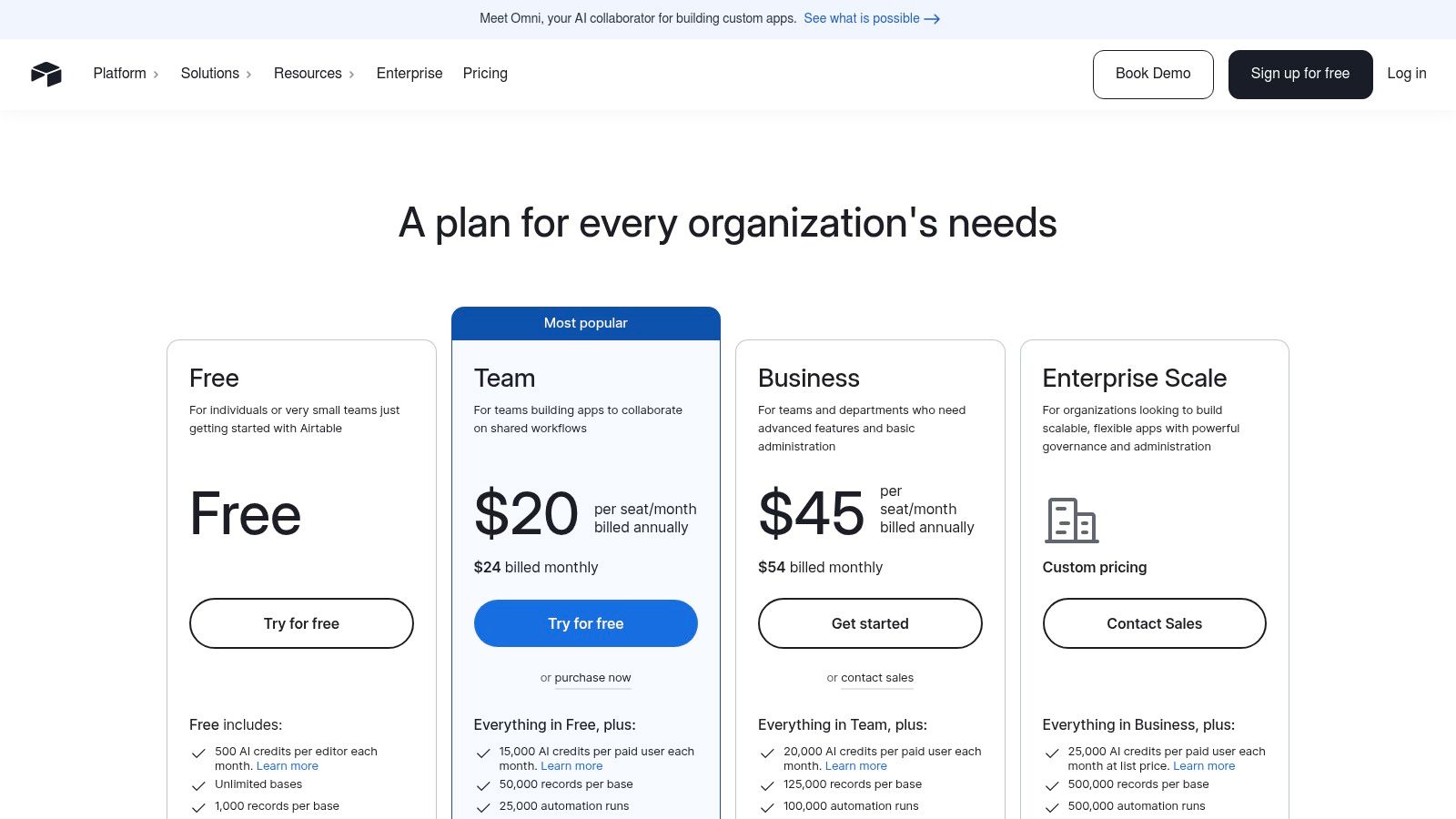
- Pricing: Offers a generous free plan with core features. Paid plans include Team (from $20/seat/month) and Business (from $45/seat/month), with Enterprise Scale plans for advanced controls and governance.
| Pros | Cons |
|---|---|
| Excellent for structured task operations and request intake | Can feel more like a database than a simple task manager |
| Scales from small teams to large organizations | Higher-tier features and usage limits can increase total cost |
| Powerful customization via extensions and a robust API | Governance requires careful schema and permission design |
11. G2 – Task Management Software Category
Instead of being a single tool, G2’s Task Management Software category is an essential research hub for teams evaluating their options. It functions as a meta-resource, aggregating user reviews, satisfaction scores, and market presence data to help organizations make an informed decision. The platform's Grid® report is a practical tool for visualizing leaders, contenders, and niche players based on verified user feedback, allowing you to quickly see which tools are highly rated by companies of a similar size to your own.
This approach is invaluable for shortlisting vendors. For example, you can use G2's filters to find all task management apps that integrate with Salesforce, are suitable for a team of 50-100 people, and have a satisfaction score of at least 4.5/5. This instantly narrows a field of hundreds of options down to a manageable few. For organizations seeking small business workflow management software, these filters quickly separate enterprise-grade platforms from more agile solutions.
Key Considerations for G2
- Best For: Teams in the procurement or evaluation phase, IT leaders, and department heads tasked with selecting a new task management platform.
- Google Workspace Integration: N/A – G2 is a review platform, but it allows filtering for apps that offer specific integrations, including Google Workspace.
- AI & Automation: N/A – While not a feature of G2 itself, you can use user reviews and product feature lists to identify which task management apps have strong AI and automation capabilities.
- Pricing: G2 is free to use for buyers and researchers. Vendors pay for premium profiles and marketing placements on the platform.
| Pros | Cons |
|---|---|
| Aggregates a high volume of verified user reviews | Sponsored placements and vendor marketing can influence visibility |
| Robust filtering helps narrow the field by specific needs | Deep feature verification still requires hands-on product trials |
| Grid® reports offer a quick visual market summary | Review quality can vary, requiring critical assessment |
12. Capterra – Task Management Software Category
Rather than a single application, Capterra’s Task Management Software category serves as a crucial starting point in the research phase for any organization. It's an extensive buyer's guide and comparison directory, providing a comprehensive market overview that helps teams filter and shortlist potential solutions. It is particularly useful for quickly understanding pricing models and core feature sets before committing time to a product demo.
The site excels at organizing a vast amount of information into digestible formats. A key practical feature is the side-by-side comparison table, where you can select up to four products and see a direct, feature-by-feature breakdown of what each offers. This helps clarify differences in areas like time tracking, reporting, and integration capabilities. Capterra’s provider profiles offer a quick snapshot of each tool's core functionality, along with direct links to official websites and free trials, streamlining the initial discovery and vendor evaluation process.
Key Considerations for Capterra
- Best For: Procurement managers, IT leaders, and executives at the beginning of their software selection process needing to compare dozens of tools efficiently.
- Google Workspace Integration: N/A, as it's a directory. However, individual tool listings often specify their integration capabilities with Google Workspace.
- AI & Automation: N/A. The platform itself does not have these features, but it allows users to filter and search for task management apps that do.
- Pricing: The Capterra directory is completely free for buyers to use. Revenue is generated from software vendors who pay for placement and lead generation.
| Pros | Cons |
|---|---|
| Extensive catalog of software with frequent updates | Sponsored profiles can influence search result placement |
| Helpful for initial market research and vendor shortlisting | Displayed pricing may lag behind official vendor websites |
| Free to use, providing direct click-throughs to vendors | Reviews can be generalized and may lack deep technical detail |
Top 12 Team Task Management Apps Comparison
| Product | Core features | UX / Quality (★) | Value & Pricing (💰) | Target (👥) | Unique selling points (✨ / 🏆) |
|---|---|---|---|---|---|
| Asana | Workflow builder, Timeline/Gantt, reporting, automations | ★★★★☆ | 💰 Mid–High (enterprise tiers for advanced) | 👥 Cross‑functional teams → portfolios | ✨ Robust reporting & dependency planning · 🏆 Enterprise governance |
| monday.com Work Management | Visual boards, automations, dashboards, templates | ★★★★☆ | 💰 Mid (seat & action quotas) | 👥 Mid‑market teams needing visibility | ✨ Highly customizable data model · strong admin controls |
| ClickUp | Tasks, docs, whiteboards, time tracking, goals | ★★★★☆ | 💰 Low–Mid (feature-rich plans) | 👥 Teams consolidating multiple tools | ✨ Deep feature set at value price · 🏆 24/7 support & automations |
| Trello (Atlassian) | Kanban boards, Butler automation, expanded views | ★★★★☆ | 💰 Low (affordable entry) | 👥 Fast-adopting, non‑technical teams | ✨ Simple UX with broad integrations · quick onboarding |
| Notion | Docs + databases, templates, Notion AI & agents | ★★★★☆ | 💰 Low–Mid | 👥 Teams combining knowledge & process | ✨ Flexible building blocks for docs + tasks · strong wiki use |
| Wrike | Structured workflows, Gantt, AI Copilot, integrations | ★★★★☆ | 💰 Mid–High (add‑ons common) | 👥 Governed enterprise teams | ✨ Scalable packaging & governance · 🏆 Rich automation |
| Smartsheet | Grid/Gantt views, formulas, portfolio reporting | ★★★★☆ | 💰 Mid–High (best with add‑ons) | 👥 Ops teams preferring spreadsheet UX | ✨ Spreadsheet paradigm + portfolio reporting |
| Basecamp | To‑dos, Card Table, messaging, scheduling | ★★★☆☆ | 💰 Low (predictable Pro Unlimited) | 👥 Small teams & contractors | ✨ Minimal overhead with predictable pricing |
| Microsoft Planner (+Project) | Planner tasks, Project portfolios, Copilot, M365 integration | ★★★★☆ | 💰 Mid (bundled with M35/Project) | 👥 Organizations standardized on M365 | ✨ Deep Teams/Outlook/SharePoint integration · 🏆 Enterprise security |
| Airtable | Relational bases, automations, API, extensions | ★★★★☆ | 💰 Mid–High (usage limits matter) | 👥 Teams needing relational workflows & intake | ✨ Powerful schema/customization & extensibility |
| G2 – Task Management Category | Review grids, leader badges, filterable comparisons | ★★★★☆ | 💰 Free to use | 👥 Buyers shortlisting vendors | ✨ High‑volume user reviews & market presence · 🏆 Fresh comparative data |
| Capterra – Task Management Category | Buyer’s guides, side‑by‑side tables, curated lists | ★★★★☆ | 💰 Free to use | 👥 Early‑stage buyers & procurement | ✨ Curated shortlists & vendor profiles for discovery |
Beyond the App: Turning Your Tool into a System
We've explored a comprehensive landscape of the industry's best task management apps for teams. From the flexible, project-oriented power of Asana and monday.com to the all-in-one workspace potential of ClickUp and Notion, the right tool for your organization is on this list. We analyzed how platforms like Wrike and Smartsheet cater to complex, enterprise-level needs, while Trello and Basecamp offer elegant simplicity for specific use cases.
The core takeaway is this: the software itself is not the solution. It is merely the vehicle. True operational excellence isn't achieved by simply purchasing a license; it's realized when you transform that software into a deeply integrated, highly automated operational system. The most common point of failure for any new tool implementation is not a lack of features, but a lack of systemic adoption and workflow engineering.
From Software Purchase to Operational System
Choosing between ClickUp's granular customization and Trello's visual simplicity is a critical first step. However, the real return on investment comes from what happens next. The goal is to move beyond manual task entry and status updates into a state of seamless, automated workflow orchestration.
Consider these critical implementation factors:
- Standardization is Non-Negotiable: Your chosen platform must have a single, unified method for project creation, task assignment, and status reporting. Practically, this means creating templates for common projects and defining what each status ("In Review," "Blocked") actually means, so everyone is speaking the same language.
- Integration is Leverage: A task management app that remains an island is a liability. Its true power is unlocked when it communicates with your other tools. A practical example is an automation that creates a new project in your task app whenever an opportunity is marked "Closed-Won" in your CRM, eliminating manual data entry.
- Adoption Requires Champions: You cannot simply send an email and expect universal adoption. Identify internal champions, provide structured training sessions focused on your specific workflows, and build an internal knowledge base with quick-start guides and video tutorials. Success depends on your team understanding not just how to use the tool, but why it's being used a certain way.
Making the Right Choice for Your Team
To distill this comprehensive guide into a final decision-making framework, evaluate your options through these three strategic lenses:
- Complexity vs. Simplicity: Does your organization require the robust, enterprise-grade features of a Smartsheet or the straightforward, intuitive interface of a Basecamp? Be honest about your team's actual needs versus perceived wants. Over-investing in a complex tool that goes unused is a common and costly mistake.
- Consolidation vs. Specialization: Are you aiming for an "all-in-one" platform like Notion or ClickUp to consolidate your workflows, or do you need a best-in-class, specialized tool like Asana to plug into an existing, well-oiled tech stack? The former simplifies user management, while the latter offers deeper functionality in its specific domain.
- Tool Capability vs. Operational Reality: This is the most crucial consideration. Every tool we've reviewed offers powerful automation and AI features. The key question is: do you have the internal resources, time, and expertise to design, implement, and maintain the custom workflows that will truly move the needle? If the answer is no, the tool's potential will remain untapped. The administrative burden of managing the system will simply shift, not disappear.
Ultimately, selecting one of the best task management apps for teams is just the beginning of your journey toward peak operational efficiency. The real challenge, and the greatest opportunity, lies in weaving that tool into the very fabric of how your team works. It's about building a system that serves your people, not the other way around.
Is your primary challenge not the tool itself, but the immense administrative overhead required to build and operate the workflows within it? OpsHub acts as a human-operated AI layer for your existing software, designing and running the bespoke operational systems that eliminate administrative drag and free your leadership to focus on strategic growth. Learn how we turn your tool's potential into a reality at OpsHub.
Share This Story, Choose Your Platform!
TUNE IN

OpsHub Signal publishes analysis, essays, and field notes on operations, capital, policy, and systems design. Subscribe to receive a weekly briefing that cuts through noise and delivers what actually matters to operators.