

Systems integration is the process of making your separate software tools and applications work together as a single, coordinated team. It's the technical bridge that ensures your CRM actually talks to your accounting software and your project management tool seamlessly shares updates with your client portal. The practical goal is to create a smooth, automated, and uninterrupted flow of information across your entire business.
What Is Systems Integration? A Practical Answer

Imagine each of your business tools is a world-class musician. Your CRM is a brilliant violinist, your ERP system handles the powerful percussion, and your marketing platform is a gifted pianist. On their own, they’re impressive. But without a conductor to coordinate their efforts, all you get is noise—not music.
Systems integration is that conductor. It organizes individual applications into a cohesive orchestra, making sure data flows harmoniously between them. This connection eliminates the operational drag of data silos and the soul-crushing routine of manual data entry, creating an automated and efficient workflow.
The Real-World Goal (Beyond the Jargon)
At its heart, understanding systems integration isn’t about memorizing technical acronyms like API or middleware. It's about solving real, everyday business problems. Think about the friction points that drain your team’s time and energy right now:
- Endless Data Entry: An employee spends hours every week just copying new customer information from a lead form into three different systems.
- Painfully Slow Reporting: Leadership can't get a clear picture of performance because someone has to manually pull and combine data from separate financial and operational tools.
- Conflicting Information: Your sales team is looking at one customer record in the CRM, while the support team sees a completely different, outdated version in their helpdesk software.
These small, nagging inefficiencies pile up. They stall growth, kill momentum, and frustrate your best people. Integration is the practical step you take to turn that fragmented chaos into a well-oiled machine.
Systems integration isn't just a technical task; it's a strategic solution to the daily operational friction that prevents your business from scaling efficiently. By connecting disparate systems, you create a single source of truth that empowers better decision-making and frees your team to focus on high-value work.
To see just how big of a difference this makes, let's look at the before-and-after picture.
The Impact of Systems Integration
| Business Challenge | Before Integration (Siloed Systems) | After Integration (Connected Systems) |
|---|---|---|
| Onboarding a New Client | Manual data entry into 4+ systems (CRM, billing, project management, etc.). Risk of human error is high. | A single form entry automatically creates client profiles, projects, and invoices across all connected platforms. |
| Generating Monthly Reports | Staff spend days manually exporting and merging spreadsheets from different software tools. | Real-time dashboards pull live data from all sources, providing instant, accurate business insights. |
| Updating Customer Information | A change made in one system (e.g., a new address in the CRM) is not reflected in others, leading to confusion. | Updates are instantly synchronized everywhere, ensuring every team works from the same consistent information. |
This table shows a clear shift from reactive, manual work to proactive, automated operations—the very foundation of a scalable business.
Why Connectivity Is No Longer Optional
The push for connected systems isn't just a passing trend; it's a fundamental shift in how successful businesses operate. The global systems integration market is projected to skyrocket from approximately USD 590 billion in 2025 to USD 1,946 billion by 2034.
This explosive growth isn't happening in a vacuum. It shows just how critical integration has become for any company that wants to stay competitive and operate efficiently.
Ultimately, getting your systems to work together is the backbone of modern operations. You can learn more about applying these concepts by exploring our guide to small business workflow management software.
The Hidden Costs of Disconnected Systems
Disconnected systems are more than just a minor headache; they're a silent tax on your organization's resources. This operational drag creates friction that doesn't show up on a balance sheet but manifests as lost productivity, wasted leadership hours, and missed opportunities that quietly stunt your growth.
Think about a sales team ready to close a big deal. They’re stuck waiting for someone in finance to manually pull and reconcile customer data from three different spreadsheets just to send an invoice. That delay introduces unnecessary risk and frustrates both the client and your top performers. This isn't just an inconvenience—it's a real competitive disadvantage.
Or consider a marketing team that can't personalize their outreach because critical customer history is locked away in the CRM, completely isolated from their email platform. The result? Generic messaging that falls flat, weakening customer relationships and tanking campaign performance.
Quantifying the Financial Drain
These daily frustrations add up to a significant, measurable cost. When your teams are stuck with manual data entry, constant cross-checking, and building one-off workarounds, they are burning countless hours that should be spent on strategic, high-value work. This inefficiency hits your bottom line, hard.
The numbers don't lie. Poor integration can cost businesses 20-30% in lost productivity every year. Worse yet, ignoring the problem can leave up to 40% of your technology investments siloed and underutilized, which is like throwing a huge chunk of your software budget out the window. You can learn more about the financial impact from recent industry market analysis.
This constant friction does more than just drain money. It kills employee morale, burns out your best talent, and fosters a reactive culture where everyone is constantly putting out fires instead of preventing them. For a closer look, explore our guide on how to improve your IT incident management best practices and see how connected systems stop these fires before they start.
The true cost of disconnected systems isn't just the time spent on manual work; it's the cumulative effect of delayed decisions, missed opportunities, and the strategic drag that prevents your entire organization from reaching its full potential.
Building the Business Case for Integration
Thinking of systems integration as just another IT project completely misses the point. It’s a direct investment in your competitive advantage. When you connect your digital tools, you aren't just fixing a technical issue; you are building a more agile, responsive, and scalable organization from the ground up.
Look at the strategic wins you unlock:
- Accelerated Decision-Making: When leaders get real-time, unified data, they can make smarter strategic calls on the fly instead of waiting days for someone to cobble together a report.
- Enhanced Customer Experience: A single, accurate view of each customer empowers every department—from sales to support—to deliver consistent, personal, and high-quality service every single time.
- Improved Operational Agility: Automated workflows help your business pivot quickly with market changes, scale up without massively increasing headcount, and focus your team's energy on actual growth.
Ultimately, tackling the hidden costs of disconnected systems is about tearing down the invisible walls holding your business back. It's about giving your team the seamless flow of information they need to innovate, collaborate, and win.
Exploring Common Systems Integration Methods
You don't need a degree in computer science to understand how software systems connect. At its heart, systems integration is all about building bridges for data to travel between your different applications. But just like in the real world, not all bridges are built the same—each approach is a tool suited for a different job.
Point-to-Point Integration
The most straightforward method is Point-to-Point Integration. Think of it as a direct, private data pipeline between two specific applications. When your CRM needs to send new lead info to your email marketing tool, you create a single, dedicated connection just for that task. It’s fast to set up and works perfectly for a simple, one-off need.
The problem starts when you scale. What happens when ten different applications all need to share data with each other? You end up with a tangled mess of 45 individual connections. This "spaghetti integration" is incredibly fragile and a nightmare to maintain. A small update to one system can break nine other connections, turning a routine task into a major fire drill.
The Hub-and-Spoke Model
To bring order to the chaos, the Hub-and-Spoke Model was developed. Picture a central data switchboard. Instead of every application connecting directly to every other one, they all plug into a central "hub." This hub acts as the traffic controller, routing data and messages between the different systems (the "spokes").
This is a huge improvement in organization. Adding a new application means just one new connection to the hub, not a dozen new point-to-point links. The big risk? The hub becomes a single point of failure. If that central switchboard goes down, all communication across your entire organization grinds to a halt.
When these systems can't communicate, the hidden costs start piling up—wasted time, duplicated effort, and missed opportunities.
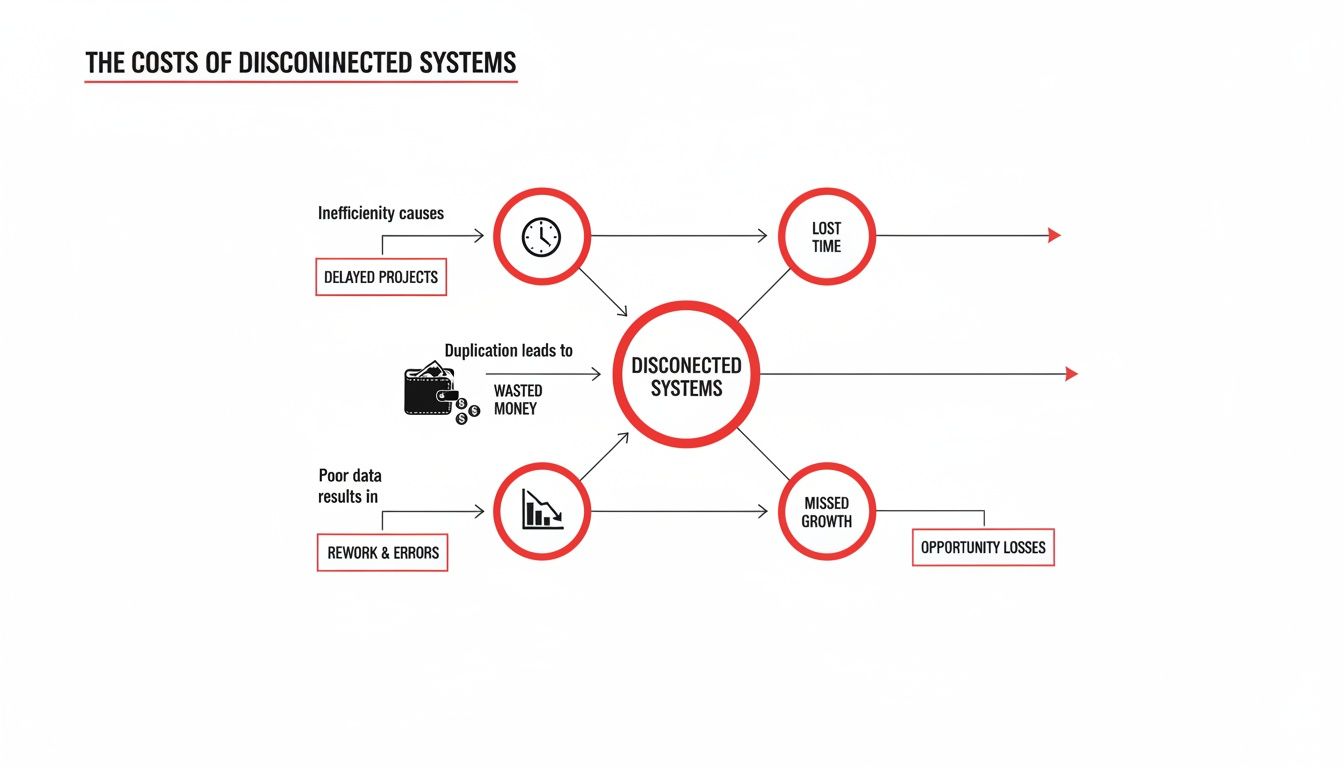
As you can see, even small disconnects create significant operational drag that directly hits your bottom line.
API-Led Integration
Today, the most modern and flexible strategy is API-Led Integration. An API, or Application Programming Interface, is essentially a universal translator that most modern software provides. Instead of building rigid, custom connections, systems use these standardized APIs to communicate in a common language.
This approach is both powerful and scalable. Each application exposes its functions through a secure, well-documented API, allowing other systems to plug in and use them without needing complex custom code. It gives you the freedom to add, remove, or swap out applications without blowing up your entire tech stack. This is what underpins agile, modern business operations. For those needing to meet specific compliance standards, understanding the technicals, like the Exact REST API for compliant integration, is key.
Actionable Insight: For growing businesses, an API-led strategy is the most future-proof option. A simple point-to-point link might solve an immediate headache today, but an API-led strategy builds a real foundation for future growth and agility tomorrow.
Each of these methods solves the same fundamental problem: getting your systems to talk to each other. By understanding the basic trade-offs, you can contribute more effectively to conversations about your organization's technology strategy. To see how this works in practice, you might find it helpful to explore some common intelligent automation use cases.
Real-World Systems Integration Examples

Theory is useful, but the real "aha!" moment comes from seeing integration solve tangible business problems. These examples show how connecting the right tools can eliminate frustrating bottlenecks and give your team a serious operational edge.
For Medical Practices Automating Billing
Imagine a busy medical practice with an Electronic Medical Records (EMR) system for patient care and a separate platform for billing. The problem? There's a human bridge between them. After every visit, an administrator has to manually transfer treatment codes, patient data, and insurance details from the EMR into the billing software.
This isn't just slow; it's a recipe for expensive mistakes. One wrong digit in a treatment code can get a claim denied, kicking off a painful cycle of corrections and resubmissions that kills cash flow.
With a simple point-to-point integration, this entire manual step disappears. As soon as a doctor finalizes a patient's chart in the EMR, all the necessary billing data flows directly to the billing system, generating a perfect claim in seconds.
The Result: The practice slashes its billing cycle by over 70%. Claim denial rates plummet, and the admin team can finally focus on higher-value work, like helping patients navigate complex financial questions.
For Non-Profits Boosting Donor Engagement
A growing non-profit has its donor information in one database and its email marketing tool in another. When it's time to send a fundraising email, a staffer has to pull a list from the database, spend time cleaning up the spreadsheet, and then upload it to the email platform.
This cumbersome process makes it nearly impossible to be timely or personal. An urgent appeal gets stuck in spreadsheet purgatory for a day, and segmenting donors based on their giving history becomes a massive headache.
By integrating the two systems, the non-profit builds a powerful communication machine.
- Automated Welcome Series: New donors automatically receive a sequence of welcome emails.
- Targeted Campaigns: The team can effortlessly create campaigns for specific groups, like "donors who gave last year but not this quarter."
- Personalized Updates: Donation confirmations and impact reports go out instantly, with zero manual effort.
For B2B Firms Unifying Client Data
A B2B company uses a CRM to track sales and a separate project management tool for client work. The two worlds never collide. Account managers have no idea if a client's project is on track, and project managers can't see the original contract terms or sales history.
This information gap creates friction. An account manager might call to upsell a client whose project is currently on fire—a surefire way to damage the relationship.
Integrating the CRM and project management tool creates a 360-degree view of the client. Now, key project milestones and status updates appear right inside the client’s CRM profile. Project managers can see the important contract details without having to chase anyone down. This is one of the most effective examples of how automation for small business can directly improve both efficiency and client satisfaction.
Integration Use Cases By Department
Systems integration isn't just for one team; its benefits ripple across the entire organization. When you connect disparate software, you unlock new efficiencies and insights for everyone. Here’s a practical look at how different departments can put integration to work.
| Department | Systems To Integrate | Key Benefit |
|---|---|---|
| Sales | CRM + Email Marketing | Automate lead nurturing and get a unified view of every prospect's engagement. |
| Marketing | Analytics Platform + Ad Networks | Instantly see which campaigns are driving real revenue and optimize ad spend. |
| Finance | Accounting Software + Expense Reporting | Eliminate manual data entry for expense reports and close the books faster. |
| HR | HRIS + Payroll System | Ensure new hire data, salary changes, and terminations are perfectly synced. |
| Operations | Project Management + Time Tracking | Get accurate, real-time data on project profitability and team allocation. |
As you can see, the goal is always to get the right information to the right place at the right time, removing the manual work that slows people down and introduces errors.
Turning Integration Challenges Into Opportunities
Let's be honest: the thought of a big integration project can be intimidating. We often picture months of work, eye-watering budgets, and the need for a team of specialized developers. That image alone is enough to make many leaders pause, leaving them stuck with the exact operational headaches they were trying to solve in the first place.
But what if that old, clunky model wasn't the only way? The technical complexity of connecting your systems doesn't have to be your team's problem to solve. A modern, service-led approach completely changes the game, turning a potential tech nightmare into a straightforward business win.
A Modern, Service-Led Approach
Think about it this way: what if you could have a world-class IT team on standby, ready to design, build, and manage the precise workflows your business needs to thrive? That's the essence of a "white-glove" integration service. Instead of your people getting lost in the weeds of APIs and data mapping, you bring in experts who handle the entire process for you.
This human-led, AI-powered model works with the tools you already have. There's no need to rip out and replace the software your team uses every day. The conversation shifts from technical specs to business outcomes. You point to a point of friction, and the service builds the bridge to smooth it out.
Actionable Insight: This approach is about getting all the benefits of sophisticated automation without the traditional overhead. It makes powerful integration accessible to any organization, especially those that don't have—or want—a huge internal IT team dedicated to custom projects.
From Technical Hurdle to Strategic Advantage
This shift in perspective is everything. It changes the core question from "How do we build this?" to "What problem do we want to solve?" This frees up your leadership to focus on growing the business, not managing a complex IT initiative. The technical details are handled by someone else, making integration a direct tool for boosting efficiency and profitability.
With a managed service, you get:
- Faster Time-to-Value: Custom workflows get designed and launched in a fraction of the time it would take to build them from scratch.
- Reduced Risk: You have experts managing the build, ongoing maintenance, and monitoring, which means your automations run like clockwork.
- No New Hires: You get enterprise-grade capabilities without the expense and difficulty of hiring specialized talent.
Ultimately, this strategy flips the entire dynamic. It allows organizations to stop seeing integration as a problem and start using it as a solution. Through smart planning, you can leverage a robust ServiceNow integration for transforming enterprises with unified data to unlock new levels of operational excellence. It’s all about getting the results you want—seamless data, automated processes, and smarter decisions—without getting bogged down in the technical details.
Common Questions We Hear About Systems Integration
Even with a solid grasp of the "what" and "why," practical questions always pop up when it's time to actually consider integrating your systems. Let's tackle some of the most common ones we hear from leaders who are ready to move from idea to action.
How Long Does a Typical Systems Integration Project Take?
The timeline can range from a few weeks to several months, but the old-school model of massive, year-long IT overhauls is a thing of the past. The key is to focus on targeted integrations that solve a specific, high-value problem. Instead of trying to connect everything at once, start by automating a single critical report or syncing new customer data between your CRM and email marketing platform. These focused projects can often be up and running much faster, delivering real business value in a fraction of the time a traditional in-house build would take.
Do I Need a Big IT Team to Handle This?
Not anymore. This is a huge shift from how things used to be. While a complex, self-managed integration project does require specialized IT staff, modern tools and managed services have completely changed the game. Platforms like Integration Platform as a Service (iPaaS) or a full-service provider can completely remove this burden from your team.
Actionable Insight: With a managed service, the provider doesn't just build the integration; they also monitor it, maintain it, and fix it if it breaks. You get all the power of automation without the headache and overhead, making top-tier integration accessible even if you don't have a large IT department.
What's the Very First Step We Should Take?
Start small, and focus on the pain. The best way to begin is by identifying your single biggest point of operational friction. Instead of trying to boil the ocean with a massive plan, ask your team: "What's the one manual task that wastes the most time and drives everyone crazy?"
Solving one high-impact problem first is the way to go. For example:
- Automate your invoicing. Connect your project management tool directly to your accounting software and get that time back.
- Sync your customer data. Ensure your CRM and customer support desk always have the same, up-to-date information on every client.
A targeted workflow that delivers a quick, measurable win is the perfect way to prove the value of integration and build momentum for what comes next.
Isn't Systems Integration Just for Big Corporations?
This is probably one of the biggest myths we hear about what is systems integration. Historically, yes—it was a complex, expensive strategy that only large enterprises could afford. But that's ancient history now. Thanks to cloud technology, APIs, and AI-powered platforms, integration is now both affordable and accessible for businesses of all sizes. It’s become an essential strategy for any midsize company or growing startup that wants to run lean, kill manual work, and scale without being suffocated by its own processes.
Ready to stop the operational drag and turn your systems into a cohesive, efficient machine? OpsHub designs and operates custom AI-enabled workflows that sit inside your existing business environment, removing the friction that consumes leadership time. Schedule a call to see how we can help.
Share This Story, Choose Your Platform!
TUNE IN

OpsHub Signal publishes analysis, essays, and field notes on operations, capital, policy, and systems design. Subscribe to receive a weekly briefing that cuts through noise and delivers what actually matters to operators.