

Let's be honest, the term "integrated project management system" gets thrown around a lot. But what does it actually mean for your daily operations? It’s not just another piece of software. It’s the central nervous system that connects every tool, team, and process involved in getting work done. Think of it as the master conductor for your operational orchestra, ensuring sales, finance, and project delivery are all playing from the same sheet of music.
Instead of your teams hopping between different apps and manually copying-and-pasting data, an integrated system creates one central command center. Everything is connected, which kills the need for duplicate data entry and gives everyone a single, reliable view of what’s happening.
What an Integrated Project Management System Really Means

Most organizations operate on a collection of software islands. Your sales team lives in their CRM. Finance is buried in accounting software. And your project managers have their own favorite task management tools. This is the norm, but it’s a recipe for chaos.
To figure out if a project is profitable, a COO or IT lead has to become a data detective. They’re forced to pull reports from each of these islands, stitch them together in a spreadsheet, and cross their fingers that the numbers match up. It's a slow, error-prone process that grinds productivity to a halt.
An integrated system doesn't just visit these islands; it builds permanent bridges between them, creating a single, connected continent of information. When something happens in one department, the right information flows instantly and automatically to all the others.
Here's a practical example: a salesperson marks a deal as "Closed-Won" in your CRM. Without anyone lifting a finger, an integrated system can immediately:
- Trigger an invoice in your accounting platform.
- Create a new project in your PM tool, complete with a pre-built task template.
- Assign the project team and send out kickoff notifications.
Moving Beyond Disconnected Tools
This is about more than just convenience; it's about eliminating the friction that kills growth. While the project management software market is booming, the integration gap is a massive, unspoken problem. The average enterprise is running a staggering 976 different applications, yet only 28% of them are actually integrated in a meaningful way. That disconnect is where productivity goes to die.
At its core, an integrated system isn't just another tool to add to the pile; it's the strategic solution that makes all your other tools work together intelligently. It provides the foundation for seamless data flow, which is crucial for modern operations.
A Practical Comparison of Siloed vs Integrated Systems
To really grasp the difference, let's look at a side-by-side comparison of daily life with and without an integrated system.
| Operational Area | Siloed Systems: The Problem | Integrated System: The Solution |
|---|---|---|
| Project Kickoff | A salesperson closes a deal. Someone has to manually create a project, copy-paste client details, and email the team to get started. Delays are inevitable. | A "Closed-Won" deal in the CRM automatically creates a new project, assigns the team, and populates all necessary client data. Work begins immediately. |
| Financial Tracking | Finance has to chase down project managers for timesheets and expense reports. Project profitability is a guess, calculated weeks after the fact. | Time tracking and expenses are logged directly against project tasks, giving finance a real-time view of budget vs. actuals. No more guesswork. |
| Client Reporting | To give a client an update, you have to pull data from three different systems, build a report in a spreadsheet, and hope it’s accurate. | A unified dashboard shows project progress, budget status, and key milestones in one place. Reports are generated instantly and are always up-to-date. |
| Team Collaboration | Team members communicate in emails, Slack, and the PM tool. Important conversations and decisions get lost in the shuffle. | All project-related communication, files, and decisions are attached directly to the relevant tasks, creating a single, searchable record. |
The contrast is stark. One approach is built on manual work and constant friction, while the other is designed for flow and clarity.
The Power of a Single Source of Truth
An integrated system is built on the principle of seamless data flow. Getting this right means understanding data integration best practices and applying them to your unique operational needs.
This fundamentally changes how you make decisions. Instead of managing from outdated spreadsheets and gut feelings, leaders get a live, unified view of every project’s health—from the first sales call to the final invoice. This is the core purpose of systems integration in a business context.
In today's world, that kind of visibility isn't a "nice-to-have." It’s essential for any organization that wants to stop fighting operational drag and start building a real competitive advantage.
The Core Features That Actually Make a Difference

When evaluating an integrated project management system, don't get distracted by a long list of flashy features. Focus on the core components that deliver real value. These are the functional pillars that turn chaotic, disjointed processes into a smooth, efficient operational machine.
Let’s pull back the curtain and see what makes these systems tick.
A Single Source of Truth
The foundation is a unified data repository. This is the central database where all your operational information—project details, client notes, financial data—lives together.
This single concept is a game-changer. It means everyone—from the project manager to the CEO—is working from the exact same, up-to-the-minute information. No more reconciling conflicting spreadsheets or making decisions based on outdated reports. For a COO, this is the difference between guessing and knowing.
The Automation Engine
Next is the workflow automation engine. This is the system's heart, the active component that executes your business rules without manual intervention. It eliminates the tedious handoffs that slow teams down.
A practical example is the handoff from sales to the project team. When a salesperson marks a deal as "Closed-Won" in the CRM, a powerful automation engine can instantly:
- Create a new project from a pre-defined template.
- Assign initial tasks to the right team members.
- Notify the finance team to prepare the first invoice.
This isn't just about saving time. It's about building repeatable processes that prevent critical details from slipping through the cracks—a constant struggle for any growing organization.
Unified Dashboards and Reporting
The third essential piece is the cross-platform reporting dashboard. This is your command center. It pulls data from every connected system—your CRM, accounting software, project tools—and displays it in a single, easy-to-understand view.
An integrated dashboard doesn't just show data; it provides answers. It addresses the tough questions that siloed systems can't, like which marketing campaigns lead to the most profitable projects or where your team's billable hours are really going.
Finally, none of this is possible without a robust API (Application Programming Interface). The API is the set of rules that lets different software applications talk to each other. When evaluating systems, look for a flexible, well-documented API that allows for deep, two-way integrations. This ensures your system can adapt as your business evolves.
For small teams trying to punch above their weight, finding the right project management software for small teams built on these core principles is absolutely crucial for scaling up without breaking down.
The Strategic Impact on Your Organization
Implementing an integrated project management system is a strategic move that delivers measurable results. The benefits are felt differently across various leadership roles, directly addressing the high-stakes problems that keep executives up at night. By connecting siloed functions, the system creates tangible value that speaks to the specific pressures of each department.
For a Chief Operating Officer (COO), the primary benefit is a massive boost in operational efficiency. An integrated system automates the manual handoffs between departments that burn countless hours. For a small medical practice, this means patient intake, scheduling, billing, and follow-up care can flow together in one seamless, automated workflow. The result is less administrative drag and more time for patient care.
A Clearer Financial Picture for CFOs
Chief Financial Officers (CFOs) gain unparalleled financial clarity and control. When systems are disconnected, getting a real-time pulse on a project's profitability is nearly impossible. An integrated approach brings budget tracking, resource allocation, and expense management into a single, unified view.
This allows a CFO to see, at any moment, how project timelines and staff hours are impacting the bottom line. Financial oversight transforms from a reactive, end-of-month scramble into a proactive, strategic tool. You can finally make precise resource allocation the norm, ensuring every dollar is put to work where it will deliver the best return.
An integrated system connects the dots between operational activities and financial outcomes. It provides real-time profitability analysis, enabling leaders to make data-driven decisions that directly impact financial health.
Simplifying the Tech Stack for IT Leaders
For IT Leaders, the strategic impact is simplification and security. One of their biggest challenges is "shadow IT"—the unsanctioned apps employees adopt to patch holes in the official tech stack. These rogue solutions create major data security risks and a maintenance nightmare.
An integrated project management system eliminates the need for these workarounds by providing a single, secure platform that meets the needs of different departments. This move radically simplifies the system architecture and tightens data security. The key benefits are:
- Reduced System Complexity: Fewer applications to manage, update, and secure.
- Enhanced Data Security: Centralized data control minimizes vulnerabilities from scattered information.
- Elimination of Shadow IT: Providing a tool that works stops users from seeking unsanctioned alternatives.
A consulting firm, for example, can manage its entire client lifecycle—from proposal to final deliverable—within one secure environment. This consolidation provides the IT department with total visibility and control, reducing risk and simplifying governance.
How AI and Automation Unlock True Efficiency

This is where an integrated project management system evolves from a passive data repository into a proactive operational partner. By layering in artificial intelligence and automation, the system can anticipate needs and solve problems before they escalate.
This isn't about far-off sci-fi concepts. This is about practical AI that directly attacks the daily administrative grind that bogs down your team. Instead of just holding information, an AI-powered system constantly analyzes it. It can look at your project pipeline and flag a potential resource shortage weeks from now. It can see current spending trends and alert you to a likely budget overrun. It can even spot hidden risks by connecting subtle patterns across different projects. Operational complexity becomes a source of insight, not a headache.
Making Proactive Decisions with AI
AI’s true value lies in its ability to automate complex, rule-based tasks that would otherwise require constant human attention. This frees your team to focus on strategic problem-solving instead of coordinating work.
Here’s what this looks like in practice:
- Predictive Resource Planning: The system analyzes the project pipeline and current team workloads, then suggests the optimal staffing for new projects. This helps prevent burnout and ensures every project is set up for success.
- Automated Risk Identification: AI algorithms monitor project data for early warning signs like missed deadlines or unusual budget requests, flagging potential issues for review long before they become crises.
- Intelligent Task Routing: When a new task comes in, the system identifies team members with the right skills and availability, then assigns it automatically. The right person gets the right job, every time.
This isn't just a niche idea; it's driving serious investment. The global AI in project management market was valued at USD 3.55 billion in 2025 and is expected to grow at an impressive 16.91% compound annual growth rate through 2034. This trend shows a clear shift as organizations recognize the power of AI to slash administrative costs and improve decision-making. You can dig deeper into this trend in a comprehensive market analysis here.
From Manual Handoffs to Autonomous Workflows
An integrated system with a smart automation layer can run entire cross-departmental processes on its own. A common friction point is the handoff from sales to service delivery.
With an AI-driven workflow, that entire sequence just happens. The moment a deal is marked "closed," the system can automatically create the new project, assign the pre-selected team, schedule the kickoff meeting in everyone's calendars, and draft the first invoice. No one has to send a single email.
Technologies like Robotic Process Automation (RPA) are key to making this happen by handling those high-volume, repetitive steps. This is how you build a truly resilient and efficient operational backbone.
By exploring specific intelligent automation use cases, you can see how this applies directly to the challenges you face every day. This is how a modern system gives you a real competitive edge.
A Practical Guide to Choosing the Right System
Selecting an integrated project management system is a critical decision that can either supercharge your operations or tie them in knots. The right choice fuels growth; the wrong one adds frustrating complexity.
Start not with a features list, but with an honest assessment of your operational pain points. Before you book a demo, map your core workflows. Where are the bottlenecks? Is your sales team wasting hours manually copying data into the project management tool? Pinpointing these friction points gives you a clear problem to solve. You're no longer just shopping for software; you're on a mission to fix what's broken.
Conducting Your Needs Analysis
First, assemble a cross-functional team with representatives from IT, finance, operations, and sales. This step is crucial for getting a complete picture of requirements and building buy-in from the start.
Your goal is to create a scorecard of "must-have" criteria. This is more than a simple wish list; it's a clear set of requirements that reflects what your organization truly needs to succeed.
Here are a few critical points to evaluate:
- Scalability and Performance: Ask vendors how their platform handles increased data volume and user load. Can it grow with you without performance degradation?
- API Depth and Flexibility: A system is only as integrated as its API allows. Review the technical documentation to ensure it supports deep, two-way data syncing, not just surface-level connections.
- Security and Compliance: This is non-negotiable. Ensure any platform you consider meets relevant standards (like HIPAA or GDPR) and has robust security protocols.
- User Experience (UX): If the system is difficult to use, your team won't adopt it. The interface must be intuitive and straightforward to minimize training time and maximize adoption.
Off-the-Shelf vs. Custom-Built Solutions
One of the biggest decisions is whether to choose a ready-made product or a custom build. For most small to mid-sized organizations, an off-the-shelf system is the fastest and most cost-effective path. However, if you have highly unique workflows or need to integrate with legacy software, a custom solution may be the only way to solve deep-seated operational problems. This guide to small business workflow management software can help you determine the right path.
When considering deployment, don't overlook hybrid models. While cloud-based tools dominate the conversation, hybrid deployment models are the market's fastest-growing segment, expanding at an 18.12% compound annual growth rate. This approach can offer the best of both worlds: the data control of an on-premise system with the collaboration benefits of the cloud. You can find more details on these project management market trends.
The best integrated project management system is the one that solves your most expensive problems. Frame your business case around tangible outcomes like reduced administrative hours, faster project cycles, and improved profitability to align with executive goals.
Your Implementation Roadmap: From Strategy to ROI
Rolling out an integrated project management system requires a clear and deliberate plan. A solid roadmap guides you through both the technical setup and the human side of the transition, ensuring the new system delivers a measurable return on investment. The real work begins long before anyone logs in for the first time.
Start by defining what success looks like. Bring leaders from operations, finance, IT, and project teams together. Is your primary goal to reduce administrative overhead, gain real-time financial insights, or accelerate project delivery? Nailing down these goals upfront provides a north star for every subsequent decision.
Mapping Your Workflows and Guiding Your Team Through Change
With a clear vision, map out your current workflows—the good, the bad, and the ugly. This exercise is essential for uncovering hidden bottlenecks and identifying where the new system can make the biggest impact. It forms the foundation for designing new, automated processes that fit how your team actually works.
Simultaneously, plan for the human element. Introducing a new system can create resistance. Effective change management must be woven into the process from day one.
Research shows that projects with a strong change management plan are far more likely to succeed. A striking 47% of organizations that combined implementation with change management met or beat their goals. This is a clear signal that you must manage the people side of the equation as carefully as the technical side.
A Phased Rollout and Proving Its Worth
Avoid the disruptive "big bang" launch. A phased rollout is the smarter strategy. Start small by piloting the system with one motivated department or a single high-impact workflow. This creates a controlled environment to smooth out any issues, gather feedback, and—most importantly—secure an early win. A successful pilot builds momentum and excitement for broader adoption.
Finally, measure success against the goals you set at the beginning. Tie your objectives to trackable Key Performance Indicators (KPIs) and frame your success in terms of business results:
- Reduced Administrative Overhead: Track the time your team saves by automating manual data entry and report generation.
- Accelerated Project Cycles: Measure the reduction in time from project kickoff to completion.
- Improved Cross-Functional Flow: Monitor the reduction in delays and back-and-forth communication between departments.
This data-driven approach allows you to prove the system's strategic value and demonstrate a clear, compelling return on investment.
Frequently Asked Questions
When you're considering a big operational shift like this, it’s only natural to have a few questions. Let's get right into the practical details.
How Is This Different From Using Asana With Zapier?
That’s a great question, and it gets to the heart of what makes this approach so powerful. Think of a tool like Zapier as a helpful translator between two apps—it can pass a message from one to the other, which is useful for simple, one-way tasks.
An integrated project management system, on the other hand, isn't just a translator; it's the central nervous system for your entire operation. It creates a single, unified source of truth where all your data lives and breathes together. This allows for deep, two-way integrations that don't just patch over operational friction—they eliminate it at the source by building a solid, scalable foundation.
This diagram shows how we approach the journey, moving from initial strategy to long-term impact.
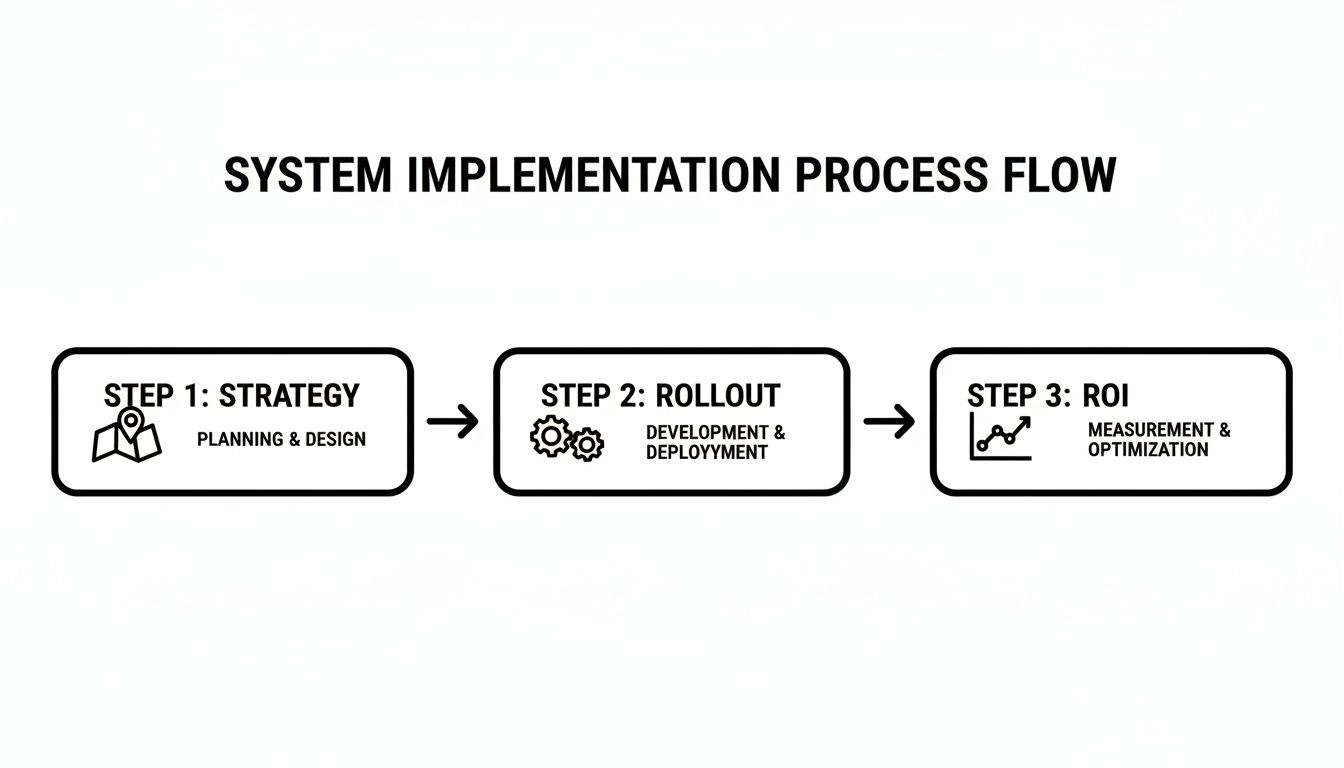
As you can see, successful implementation is a deliberate, three-part process. It's about smart strategy, a well-managed rollout, and always keeping an eye on the return on your investment.
What Is a Typical Implementation Timeline?
The timeline depends on your organization's complexity. For a smaller team with a few key integrations, you could be up and running in as little as 4 to 8 weeks.
For a midsize organization with custom workflows, historical data migration, and more complex requirements, the timeline is typically closer to 3 to 6 months.
We almost always recommend a phased rollout. Start with one department or a single high-impact workflow. This lets you prove the system's value, work out the kinks, and build momentum before expanding it across the entire organization.
How Do We Measure the ROI of This System?
Measuring your return on investment is crucial, and you should look at it from two angles: the hard numbers and the less tangible (but equally important) operational improvements.
- Quantitative ROI: Track the measurable wins. This includes things like the reduction in hours spent on manual admin tasks, faster project completion times, and better use of your team's billable hours.
- Qualitative ROI: Look for the cultural and collaborative shifts. Are your employees less frustrated? Is cross-departmental collaboration smoother? Can leaders make decisions faster because they finally have real-time data?
The key is to benchmark these metrics before you start. That way, you can clearly demonstrate the impact the system has made.
Ready to stop wrestling with administrative drag and turn your operational complexity into a real advantage? At OpsHub, we design and deploy the custom, AI-enabled workflows that make it happen. You can learn more about our approach and see how we help organizations like yours.
Share This Story, Choose Your Platform!
TUNE IN

OpsHub Signal publishes analysis, essays, and field notes on operations, capital, policy, and systems design. Subscribe to receive a weekly briefing that cuts through noise and delivers what actually matters to operators.