

Let's get straight to the point: process documentation is your organization's official playbook. It's a practical guide that lays out the clearest, most efficient route for any task, ensuring everyone reaches the same high-quality destination every single time. No more getting lost in guesswork or wasting time on rework.
What Is Process Documentation Really

At its heart, process documentation is the act of turning the know-how stuck in people's heads into a concrete, usable asset. It’s about methodically capturing every step, decision, and standard needed to get a job done right—whether that's onboarding a new client, processing an insurance claim, or managing a fundraising campaign.
The goal isn't to create a rigid, dusty manual that sits on a shelf. It's to build a living blueprint that drives consistent results. This blueprint solves the "invisible" problems that quietly drain your resources and create friction in your daily operations.
By creating a single source of truth, process documentation eliminates the chaos that arises when a key team member is unavailable or leaves, taking critical institutional knowledge with them.
Why It Is More Than Just a Manual
Good documentation is the bedrock of organizational clarity and growth. It’s not just about writing things down; it’s about tackling critical operational headaches head-on. Here's the practical impact:
- Standardize Quality: Guarantee every client or patient receives the same high standard of care by making your best practices the official standard.
- Eliminate Wasted Time: Stop your team from constantly reinventing the wheel or interrupting colleagues to ask how to handle routine tasks.
- Accelerate Onboarding: Give new hires a clear roadmap from day one, helping them become productive and confident members of the team much faster.
The need for this operational clarity is only growing. The global business process documentation tools market was valued at $1.94 billion in 2024 and is expected to climb to $3.2 billion by 2029, driven by the demand for greater efficiency.
To fully grasp what process documentation truly entails, see it as the architectural plan for a scalable, resilient organization. This foundation is also crucial for advanced operational improvements, like the ones discussed in our guide on how systems integration works, which relies on having well-defined processes to succeed.
Process Documentation At a Glance
To quickly break it down, here’s a look at the core elements of process documentation and the practical reason each one is critical for your team's success.
| Component | What It Is | Why It Matters for Your Team |
|---|---|---|
| Purpose & Scope | A clear statement defining what the process achieves and its boundaries. | Prevents confusion and ensures everyone knows when and why to use the process. |
| Step-by-Step Instructions | A detailed, sequential list of actions required to complete the task. | Eliminates guesswork and provides a clear path for new and existing team members. |
| Roles & Responsibilities | A breakdown of who is responsible for each step in the process. | Creates accountability and clarifies ownership, avoiding dropped balls. |
| Tools & Resources | A list of software, templates, or materials needed for the task. | Ensures the team has everything they need at their fingertips to execute flawlessly. |
| Performance Metrics | Key indicators used to measure the success and efficiency of the process. | Helps you track what's working and identify opportunities for improvement. |
This table provides a simple framework, but remember, the real value comes from bringing these components together into a living, breathing system that your team actually uses.
The Hidden Costs of Operational Chaos

What happens when your most critical processes live only inside your team's heads? The short answer is operational chaos—a silent drain on your resources, morale, and ability to grow. This isn't just a minor inconvenience; it carries tangible costs that leaders feel every day.
Think about the frantic scramble that happens when a star employee resigns, taking years of unwritten knowledge with them. Simple tasks become monumental challenges. Projects stall, client handoffs are fumbled, and leadership gets pulled from high-value strategic work to put out fires that shouldn't exist.
This chaos shows up in several painful ways, often creating a hard ceiling on what your organization can achieve.
The True Price of Undocumented Processes
Without a clear playbook, teams are left to figure things out on their own, and the negative impact adds up fast. Here's what it actually costs you:
- Wasted Leadership Hours: When processes are fuzzy, leaders become the default help desk. Every interruption to clarify a task or fix a preventable mistake is time stolen from strategic planning and growth.
- Damaged Client Trust: An inconsistent client intake or service delivery process leads to unpredictable outcomes. This erodes trust and increases churn as clients seek more reliable partners.
- Stalled Growth and Scalability: You cannot scale a process that isn't defined. As you try to expand, undocumented workflows break under pressure, creating bottlenecks that halt progress.
The core issue is that tribal knowledge—information held only by specific individuals—is inherently fragile. Relying on it is a significant business risk that prevents you from building a resilient, scalable operation.
Ultimately, ignoring what is process documentation means you're constantly rebuilding institutional knowledge from scratch. Each new project or hire forces you to reinvent the wheel, trapping your organization in a reactive cycle instead of building forward momentum.
Recognizing the Symptoms in Your Organization
The symptoms of poor documentation are often mistaken for other problems. A project might stall because nobody is sure who owns the next step. A costly compliance error can stem from an inconsistent intake process that varies from person to person.
By recognizing these signs, you can build a compelling business case for making documentation a strategic priority. This shift is a critical part of achieving growth, and you can explore more operational excellence best practices to learn how. Creating clear, accessible processes is the first step toward building an organization that runs on systems, not just heroics.
Choosing the Right Type of Documentation
Picking the right format for your process documentation isn’t an academic exercise—it’s about choosing the right tool for the job. Not all processes are built the same, so why would we document them that way? The practical goal is to match the format to the complexity of the task, making sure it’s actually useful for your team.
You wouldn't hand someone a detailed blueprint to show them how to make coffee. Likewise, a single sticky note isn't enough for building a house. Each type of documentation has a specific, practical role.
The Playbook: Standard Operating Procedures
Standard Operating Procedures (SOPs) are your organization's detailed, step-by-step playbooks for routine tasks. They are the foundation of consistency, ensuring everyone handles a critical process the same way, every time. Use an SOP when quality and repeatability are non-negotiable.
- Practical Example (Med Spa): An SOP for patient onboarding would meticulously outline every action: the first phone call script, scheduling steps in the system, how to take a medical history, what to cover in the pre-procedure explanation, and the post-treatment care follow-up email template. This guarantees every patient gets the same high standard of service.
The Safety Net: Checklists
Checklists are the crucial safety nets for complex tasks where missing one step could cause major problems. They aren't meant to teach a process from scratch; they act as a reminder for an expert to ensure nothing critical gets missed under pressure. Their power is in their simplicity.
- Practical Example (Non-Profit): A grant submission checklist would list every required document, signature, and deadline. This simple tool helps avoid last-minute panic and drastically cuts the risk of an application being rejected due to a small administrative error.
The X-Ray: Process Maps
Process Maps are visual guides, like flowcharts, that give you an x-ray view of a complete workflow. They are incredibly powerful for finding hidden bottlenecks, redundant steps, and opportunities for improvement. If you need to see how different people and departments work together, a process map is your best tool.
By laying out the entire flow of work visually, process maps make it easy to see where things get stuck or where handoffs are failing. This lets leaders fix the root of the problem instead of just putting a bandage on the symptoms.
For leaders, the stakes are high. Regulatory compliance often requires this kind of standardized documentation. Furthermore, getting these processes right helps avoid a share of the $600 billion companies lose from data errors annually. Shockingly, only 24% of organizations use a proper document management system, leaving most exposed. You can dig deeper into these challenges in reports on the business process documentation tools market. By choosing the right documentation type from the start, you're building a foundation to sidestep these costly mistakes.
A Practical Framework for Creating Documentation
The idea of documenting every process in your organization can feel overwhelming. The secret is to stop thinking about it as one massive project. Instead, follow this simple, practical framework that breaks it down into manageable steps, starting where you'll see the biggest and fastest return.
Step 1: Start With The Biggest Bottleneck
The best place to begin is your biggest operational headache. Forget about low-impact tasks for now. Pinpoint the one workflow that consistently causes delays, frustrates your team, or results in costly mistakes.
Ask your team: Where do you get stuck most often? Which breakdown has the most direct, negative impact on our clients? By tackling this high-friction area first, you deliver immediate value and build a strong case for documenting everything else.
Step 2: Involve The Experts On Your Team
The people doing the work every day are the only true experts on that process. This is a non-negotiable step: never create documentation in a vacuum. Sit down with the team members who live this workflow and have them walk you through it, step-by-step, including all the workarounds and nuances.
This collaboration is critical for two reasons. First, it guarantees the documentation is accurate and reflects how things actually get done. Second, it gives your team a sense of ownership, making them far more likely to use and maintain the guides you create.
Process documentation isn't just about creating manuals; it's the foundation for scaling your organization without creating chaos. It's shocking, but studies show that 97% of organizations still lack fully digital processes, contributing to an estimated $600 billion in annual errors. Meanwhile, only 24% have proper document management systems in place.
Step 3: Select The Simplest Effective Format
The format should make the task easier, not add complexity. While understanding how to create process maps is a valuable skill for a high-level view, keep day-to-day guides simple.
- Simple Checklists: Perfect for multi-step tasks where sequence matters and you just need to ensure nothing gets missed.
- Step-by-Step Guides (SOPs): Use for complex, routine processes that demand consistency and have specific actions.
- Video Walkthroughs: Incredibly effective for software-based tasks. It's often easier to show someone where to click than to describe it in words.
The diagram below shows how these different formats can work together to support your operations.
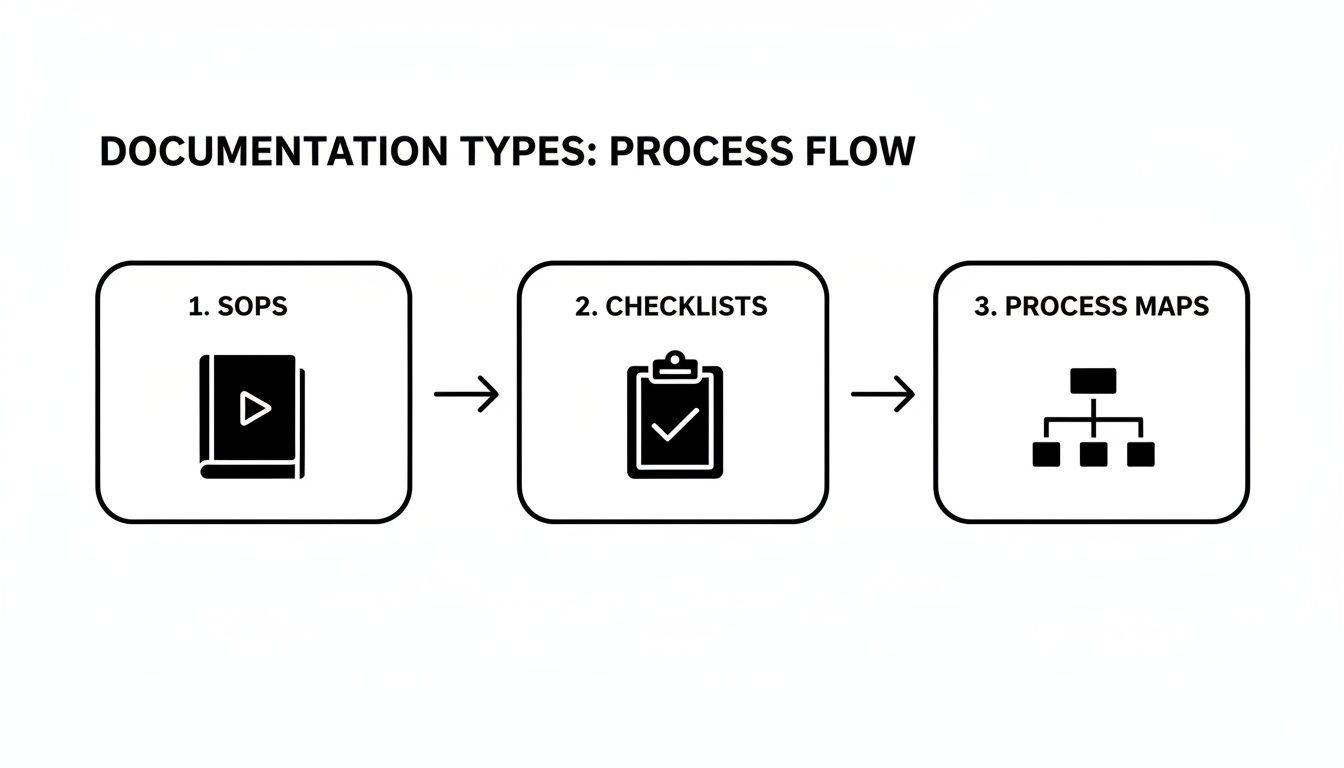
This visual clarifies how you can move from a detailed playbook (the SOP) to a quick-reference tool (the Checklist) and a high-level strategic overview (the Process Map).
Step 4: Choose The Right Documentation Tool
Once you know the what and why, figure out the where. The tool you use can make or break adoption. Here’s a quick comparison:
| Tool Type | Best For | Pros | Cons |
|---|---|---|---|
| Document Editors (e.g., Google Docs, Word) | Simple SOPs and checklists when you're just starting. | Easy to use, widely available, no extra cost. | Hard to organize, version control is a nightmare, not interactive. |
| Wiki Software (e.g., Confluence, Notion) | Centralizing knowledge into a searchable internal database. | Great for linking documents, collaborative, flexible. | Can become disorganized quickly, may require setup. |
| Project Management Tools (e.g., Asana, Trello) | Integrating documentation directly into actionable tasks. | Keeps instructions and work in the same place, good for accountability. | Not ideal for long-form documentation; can get cluttered. |
| Dedicated Process Software (e.g., OpsHub) | Building a centralized, automated system of record for all operations. | Single source of truth, integrates with other tools, automates tasks. | An investment; requires commitment to a new system. |
Ultimately, the best tool is the one your team will consistently use. Start simple, but think ahead to how your needs might grow.
Step 5: Write For Clarity, Not Compliance
Your documentation should be a helpful tool, not a dense textbook. Use simple, direct language and kill the corporate jargon. Write it so a new hire, with zero context, could pick it up and get the job done.
Use visuals heavily. Screenshots, diagrams, and short video clips break up text and make complex steps easier to follow. A one-page checklist that gets used daily is infinitely more valuable than a 50-page manual that collects dust. To learn more about optimizing your team's work, check out our guide on small business workflow management software.
Step 6: Test And Gather Real Feedback
This is the most important step. Once you have a draft, test it. Hand it to someone unfamiliar with the process and ask them to complete the task using only your guide.
Watch them. Where do they hesitate? What questions do they ask? Which steps are confusing? This real-world feedback is gold. It’s the only way to refine your document until it’s clear, accurate, and truly useful.
How Real Organizations Use Documentation to Win
It’s one thing to talk about process documentation in theory, but it’s another to see it work in the real world. When organizations move away from relying on “tribal knowledge” and create a clear, documented playbook, the results are immediate and measurable.
These aren't just stories about writing manuals. They’re case studies in building more resilient, efficient, and scalable operations. Each organization started with a specific, costly problem and used documentation as the strategic tool to solve it.
Boosting Fundraising for a Growing Non-Profit
Imagine a mid-sized non-profit where donor management is a mess. With multiple people handling donations, data entry was inconsistent, follow-ups were dropped, and the team couldn't get a clear read on its fundraising pipeline. This lack of a standard process was directly hurting their ability to secure funding.
Their solution was a simple but powerful Standard Operating Procedure (SOP) for the entire donor lifecycle. This document laid out every single step:
- How to enter a new donor into the CRM to keep data consistent.
- A checklist for acknowledging every donation within 48 hours.
- A schedule and templates for personalized follow-up messages.
The outcome was a 30% increase in fundraising efficiency. This freed up staff to stop fixing data entry mistakes and start building meaningful relationships with donors.
Slashing Errors for a Multi-Location Medical Practice
A thriving medical practice with three locations was feeling the pain of its success. Administrative errors were piling up. Patient scheduling was chaotic, leading to double-bookings and incorrect insurance filings. The front-desk staff at each office had their own way of doing things, creating a risky environment.
The core problem wasn't a lack of capable staff; it was the absence of a single, authoritative process that everyone was trained to follow.
The COO spearheaded the creation of detailed SOPs for all major administrative tasks—from scheduling and insurance verification to billing. By standardizing these workflows across all locations, the practice cut administrative errors by 50% within just six months. This improved the patient experience and dramatically reduced the risk of expensive compliance violations.
Improving Satisfaction for a B2B Service Company
A B2B service company spotted a worrying pattern: a high number of clients were leaving within the first 90 days. The culprit was a disorganized and inconsistent client onboarding process. Each project manager had their own approach, creating confusion and a poor first impression.
The leadership team sat down with the project managers to map out and document a single, unified onboarding workflow. This new process included a client-facing checklist, clear internal handoff procedures, and standard templates for kickoff meetings. The simple act of creating a predictable and professional onboarding experience led to a 15-point jump in customer satisfaction scores and a significant drop in that costly early-stage churn.
Moving From Static Documents to Active Systems

Creating a clear document is a solid start, but the real power is unleashed when that document comes to life as an automated system. The goal isn't just to write a playbook that gathers dust; it's to build dynamic workflows that actively run parts of your business.
Think of your process documentation as the blueprint for this evolution. It lays out the exact logic, steps, and handoffs that smart automation needs to take over repetitive, day-to-day work. This is how you move from just knowing what to do to building systems that actually do it for you.
From Blueprint to Automated Asset
Making the jump from a static guide to an active system solves persistent leadership headaches. It tackles tedious manual data entry, smoothes out friction between teams, and eliminates inconsistent reporting by ensuring the process runs the same way, every time.
Suddenly, all that knowledge you captured is no longer just a reference point—it’s a scalable, automated asset that works for you around the clock.
At OpsHub, this is exactly what our human-led service is all about. We take your well-defined processes and build them into custom, AI-enabled systems that plug right into the tools your team already uses.
By turning your operational knowledge into an active system, you create a powerful engine for consistency and scale. It's the difference between having a map and having a self-driving car that already knows the best route.
Turning Knowledge Into Action
This shift from static to active is the key to unlocking real operational leverage. An active system can handle routine tasks, send follow-up reminders, and shuffle data between platforms, all without anyone lifting a finger. This frees your people from administrative drag so they can focus on work that truly matters.
For example, an integrated project management system is just an empty box without documented processes. But when you build your documented steps into it, it becomes a powerful hub for automated workflows, task assignments, and progress tracking—turning your operational playbook into tangible results.
Common Questions About Process Documentation
Starting with process documentation is a big step, and practical questions and hurdles will pop up. Tackling these early is the best way to keep your momentum going and ensure your hard work pays off. Here are a few of the most common questions we hear.
How Do I Get My Team to Actually Use the Documentation?
The secret isn't enforcement; it's ownership. When you bring your team into the creation process from the beginning, they aren’t just following rules—they’re following a system they helped build.
Once it's created, make it impossible to ignore by putting all documentation in one central, easy-to-find place that your team already uses.
Most importantly, lead by example. Refer to the documents constantly in meetings and in your own work. When you treat your documentation as the single source of truth, your team will quickly follow suit.
How Often Should We Update Our Process Documents?
Think of your documentation as a living part of your business. For critical daily processes, schedule a formal review at least once a quarter to keep everything sharp.
But here’s the real rule of thumb: update a document the moment a tool, policy, or critical step changes. The most effective way to ensure this happens is to assign a "process owner" for each document. That one person is responsible for keeping it current.
What’s the Biggest Mistake to Avoid When Starting Out?
The classic blunder is trying to document everything at once. This approach almost always leads to burnout and a giant, overwhelming manual that no one ever opens.
Instead, start small and smart. Use the 80/20 rule: focus on the 20% of processes causing 80% of your headaches. Document those first. A simple, one-page checklist that gets used every day is infinitely more valuable than a perfect 50-page guide that collects dust.
Ready to turn your static documents into active, automated systems? OpsHub designs, deploys, and operates custom AI-enabled workflows that eliminate administrative drag and turn your operational knowledge into a scalable asset. Learn how we can help.
Share This Story, Choose Your Platform!
TUNE IN

OpsHub Signal publishes analysis, essays, and field notes on operations, capital, policy, and systems design. Subscribe to receive a weekly briefing that cuts through noise and delivers what actually matters to operators.