
In a landscape saturated with buzzwords, the true power of intelligent automation lies not in abstract concepts but in concrete, real-world applications. Many organizations, from non-profits to medical practices, struggle to move from theory to practice, unsure where to apply these powerful tools for maximum impact and a tangible return on investment. The potential is clear, but the starting point is often not.
This article cuts through the noise. We will explore 10 specific, actionable intelligent automation use cases that solve persistent problems across sectors including healthcare administration, non-profit operations, and finance. Forget high-level theory; this is a practical guide designed for immediate application.
For each use case, we provide a detailed, strategic breakdown:
- The Problem: The specific operational challenge you face.
- The Automated Workflow: A step-by-step look at the solution.
- Expected KPIs & ROI: The measurable outcomes and financial benefits.
- Implementation Blueprint: Actionable tips and potential pitfalls to avoid.
The goal is to provide a clear roadmap for leveraging intelligent automation to reduce administrative burdens, improve compliance, and unlock new levels of operational efficiency. We will also briefly touch upon how a platform like OpsHub can act as a central command center for these automated workflows, unifying disparate systems into a single, streamlined experience. This guide moves beyond the hype to deliver practical automation strategies that deliver real, measurable value.
1. Grant Management and Compliance Tracking
Managing multiple grants is a high-stakes, resource-intensive process, especially for non-profits and community health organizations. Intelligent automation transforms this challenge by creating a connected, automated workflow for the entire grant lifecycle, from application submission to final compliance reporting. This is one of the most impactful intelligent automation use cases for mission-driven organizations, as it frees up critical resources to focus on program delivery instead of administrative burdens.
The automated workflow involves using bots to extract data from applications, populate grant management systems, and track key dates. It can automatically pull program metrics from disparate systems (like project management or financial software) to populate compliance reports, ensuring accuracy and timeliness. This system eliminates manual data entry, reduces the risk of human error, and provides a real-time, centralized view of all grant-related activities.
Strategic Analysis & ROI
A mid-size non-profit successfully reduced grant reporting time by 60% by implementing an automated system that collected data from its program management tools. Similarly, community health organizations have used this approach to manage over 15 concurrent grants with zero missed compliance deadlines, protecting crucial funding streams.
Key Insight: The primary value is not just efficiency; it's risk mitigation. Automated compliance tracking prevents costly oversights that could jeopardize funding, a critical concern when a single missed deadline can lead to financial penalties or loss of a grant.
Expected ROI & KPIs:
- Reduced Administrative Overhead: Decrease time spent on reporting by 50-70%.
- Improved Compliance Rate: Achieve a 100% on-time submission rate for compliance documents.
- Increased Grant Capacity: Manage a higher volume of grants without increasing staff.
- Enhanced Data Accuracy: Eliminate manual data entry errors in financial and performance reports.
Actionable Implementation Tips
- Map Grant Lifecycles: Begin by documenting the end-to-end process for your most common grant types, identifying every manual touchpoint and data source.
- Centralize Your Data: Establish a single source of truth, like a dedicated grant management system or a centralized database, that the automation platform can access.
- Automate Alerts: Configure intelligent alerts for key milestones: 30, 15, and 7 days before reporting deadlines.
- Use Report Templates: Create standardized templates for common report sections that automation can populate with data pulled from connected systems.
OpsHub Integration Note
OpsHub's integration platform can serve as the backbone for this use case, seamlessly connecting grant management software, financial systems (e.g., QuickBooks), and program delivery tools (e.g., Jira, Asana). This creates a unified data flow, enabling automation to accurately pull and consolidate information for real-time compliance tracking and reporting without manual intervention.
2. Donor Relationship Management and Stewardship Automation
For non-profits, educational institutions, and faith-based groups, cultivating strong donor relationships is paramount for sustainable funding. Intelligent automation enhances stewardship by personalizing and scaling engagement without sacrificing the human touch. It automates routine communications, tracks interactions, and triggers tailored stewardship activities based on donor behavior, such as giving history and engagement levels. This is a critical intelligent automation use case for freeing up development officers to focus on building relationships with major donors.
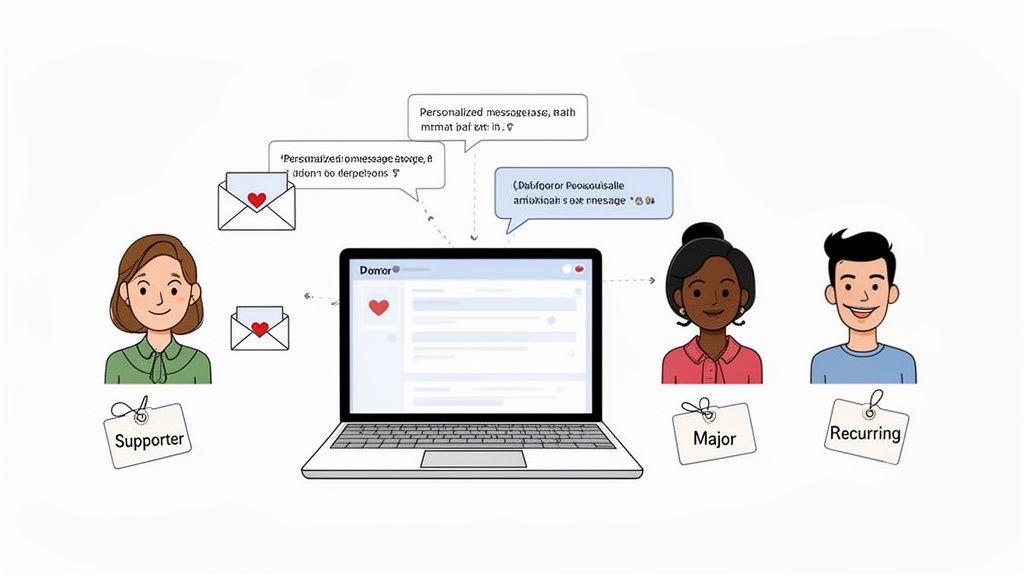
The automated workflow involves using bots to segment donors based on predefined criteria, such as donation size or frequency. These bots can then trigger personalized thank-you emails, log interactions in the CRM, and schedule follow-up tasks for fundraisers. For instance, a first-time donation could trigger an automated welcome series, while a significant gift could create a task for a development officer to make a personal thank-you call. This ensures every donor feels valued and recognized, fostering long-term loyalty.
Strategic Analysis & ROI
A faith-based non-profit successfully increased donor retention by 35% by implementing automated, personalized stewardship workflows that acknowledged every gift promptly. Similarly, educational institutions have used automation to manage alumni engagement, resulting in a 25% increase in repeat donations by sending targeted updates and impact reports based on the alumni's graduation year and past giving interests.
Key Insight: The core value is scalability with personalization. Automation allows organizations to provide a high-touch stewardship experience to their entire donor base, not just major givers, which is crucial for building a broad and resilient pipeline of support.
Expected ROI & KPIs:
- Increased Donor Retention: Improve retention rates by 20-40% through consistent engagement.
- Higher Lifetime Value: Increase the average lifetime value of a donor by fostering loyalty.
- Improved Fundraiser Efficiency: Automate 80% of routine acknowledgments and logging activities.
- Faster Acknowledgment Time: Reduce gift acknowledgment turnaround from days to minutes.
Actionable Implementation Tips
- Segment Donors: Create clear automation tiers. For example, fully automate communications for transactional donors while flagging major donors for high-touch, manual workflows.
- Use Dynamic Content: Personalize automated messages using data from your CRM, such as the donor's name, last donation amount, and designated fund.
- Map Stewardship Journeys: Design automated touchpoint sequences for different donor segments (e.g., first-time, recurring, lapsed) that feel natural and valuable.
- Create an Off-Ramp: Always include a clear and easy way for donors in an automated sequence to request personal outreach or speak to a staff member.
OpsHub Integration Note
OpsHub's integration platform connects donor management systems (e.g., Salesforce, Blackbaud) with marketing automation tools (e.g., Mailchimp) and communication platforms. This creates a unified view of each donor, enabling intelligent automation to trigger highly personalized and timely stewardship activities based on real-time data from across the organization. This ensures no donor interaction is missed and every supporter is nurtured effectively.
3. Medical Practice Appointment Scheduling and Patient Communications
For medical practices, med spas, and dental offices, efficient appointment scheduling and patient communication are the lifeblood of the operation. Intelligent automation streamlines the entire patient journey, from initial inquiry and booking to pre-visit intake and post-appointment follow-ups. This is one of the most practical intelligent automation use cases for healthcare providers, as it directly impacts patient satisfaction, reduces administrative workload, and minimizes revenue loss from no-shows.
The automated workflow uses bots to manage appointment calendars, route new patient inquiries to the correct provider, and book appointments based on real-time availability. It sends multi-channel reminders (SMS, email), distributes digital intake forms, and automatically follows up on missed appointments with rescheduling links. This end-to-end system frees front-desk staff from repetitive tasks, allowing them to focus on in-person patient care.
Strategic Analysis & ROI
A 10-provider medical practice successfully reduced its no-show rate from 12% to just 4% by implementing automated SMS and email reminders. Similarly, a med spa chain cut appointment scheduling time by 75% with an AI-powered booking system, while a dental practice improved patient retention by 20% through automated post-care follow-up communications that included educational content and check-in surveys.
Key Insight: The core value extends beyond simple efficiency; it's about optimizing the patient experience and maximizing provider utilization. Automated communication ensures patients feel informed and cared for at every step, which builds loyalty and significantly reduces costly gaps in the appointment schedule.
Expected ROI & KPIs:
- Reduced No-Show Rate: Decrease missed appointments by 50-70%.
- Increased Staff Productivity: Reduce time spent on scheduling and reminders by 75% or more.
- Improved Patient Throughput: Decrease patient check-in time by up to 60% with pre-filled intake forms.
- Enhanced Patient Retention: Boost patient loyalty and rebooking rates through consistent follow-up.
Actionable Implementation Tips
- Segment Communication: Create different reminder sequences for first-time versus returning patients to personalize the experience.
- Implement Multi-Touch Reminders: Set at least two automated touchpoints, typically 72 hours and 24 hours before an appointment, via both SMS and email.
- Automate Intake Forms: Send digital intake forms along with the appointment confirmation to collect patient information beforehand.
- Automate No-Show Follow-Ups: Configure a workflow to immediately contact missed appointments with a message of concern and a direct link to reschedule.
OpsHub Integration Note
OpsHub's integration platform connects your Electronic Health Record (EHR) system, patient communication tools (like Twilio), and scheduling software. This creates a unified ecosystem where an appointment booked in one system automatically triggers a sequence of events across others, such as sending intake forms, logging communication history in the patient record, and updating calendar availability in real-time.
4. Invoice Processing and Accounts Payable Automation
Manual accounts payable (AP) processes are a major operational bottleneck for many organizations, consuming valuable time with repetitive data entry, validation, and approval routing. Intelligent automation streamlines the entire AP lifecycle, from invoice ingestion to payment processing. This is one of the most practical intelligent automation use cases because it delivers a direct and measurable impact on financial efficiency and operational speed.
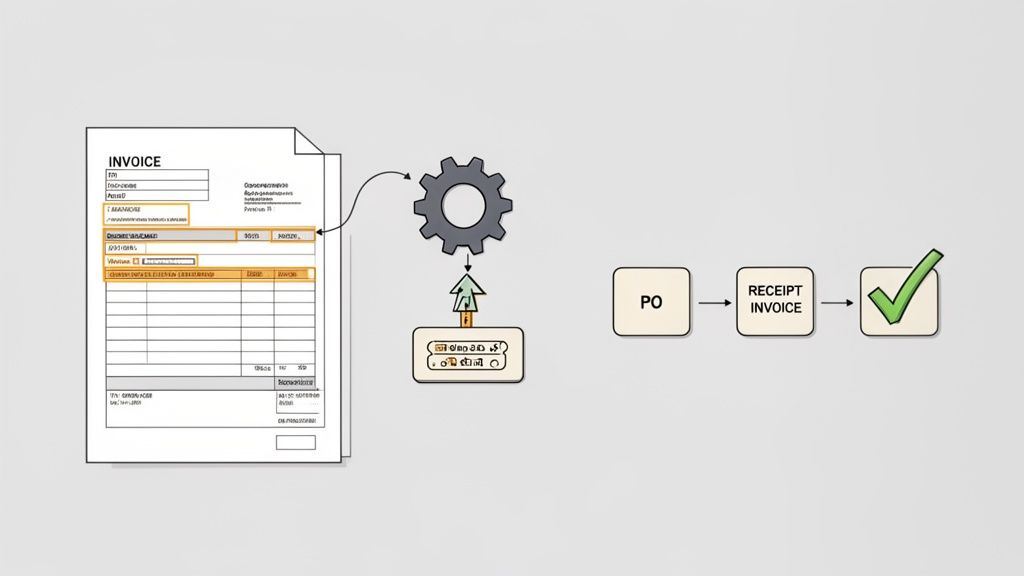
The automated workflow uses intelligent document processing (IDP) with OCR to capture data from invoices, regardless of format. The system then validates this information against purchase orders and vendor records, flags discrepancies, and routes invoices for approval based on pre-defined rules. Once approved, the data is posted directly to the accounting system, eliminating manual entry and accelerating payment cycles.
Strategic Analysis & ROI
A non-profit processing over 500 invoices monthly reduced its average processing time from three weeks to just three days. Similarly, medical practice networks have successfully eliminated up to 60% of AP staff workload by automating invoice validation and routing. This allows them to reallocate personnel to higher-value financial analysis and vendor management tasks.
Key Insight: The core benefit extends beyond cost savings to improved financial control and vendor relationships. Accelerated, accurate payment cycles enhance an organization's reputation and can unlock early payment discounts, turning a cost center into a value driver.
Expected ROI & KPIs:
- Reduced Processing Time: Decrease invoice cycle time by 70-80%.
- Lower Processing Costs: Reduce the cost per invoice processed by over 50%.
- Improved Data Accuracy: Achieve 99%+ accuracy in data extraction, minimizing payment errors.
- Enhanced Vendor Relations: Improve on-time payment performance to nearly 100%.
Actionable Implementation Tips
- Start with High-Volume Vendors: Begin by automating invoices from your most frequent, standardized vendors to demonstrate quick wins and refine the process.
- Define Exception Rules: Create clear rules that automatically flag invoices with discrepancies for human review, preventing errors from passing through.
- Map Approval Hierarchies: Implement intelligent approval workflows that mirror your organization’s signing authority and department structure.
- Automate Fraud Detection: Set up alerts for potential duplicate invoices, unusual payment amounts, or changes in vendor bank details.
OpsHub Integration Note
OpsHub's integration capabilities are central to AP automation, creating a seamless connection between your email/document intake systems, the OCR/IDP engine, and core financial software (like QuickBooks or NetSuite). By synchronizing invoice data with purchase orders and vendor master files, OpsHub ensures the automation has the clean, consistent data needed for three-way matching, validation, and posting without human intervention.
5. Project and Task Management with Intelligent Assignment
Manual task assignment is a significant bottleneck, especially for organizations with complex, multi-faceted projects like non-profits managing diverse programs or medical practices coordinating clinical trials. Intelligent automation addresses this by creating a smart coordination system that assigns tasks based on team member skills, real-time workload, and availability. This is one of the most powerful intelligent automation use cases for optimizing team capacity and project velocity.
The system continuously monitors project management tools, identifies new tasks, and uses a rules-based engine to determine the best-suited team member. It can cross-reference skills inventories, calendars, and current task loads to make an optimal assignment. The automation then tracks progress, flags potential delays, and automatically escalates bottlenecks to project managers, providing a real-time, hands-off overview of project health.
Strategic Analysis & ROI
A non-profit serving homeless populations reduced program coordination overhead by 50% while tripling its program management capacity using this approach. In healthcare, medical practices have improved clinical trial enrollment by 40% through more efficient task assignment and follow-up. Grant-dependent organizations have also seen a 25% reduction in budget variance by linking automated task tracking to financial oversight.
Key Insight: The strategic advantage is proactive resource management. Instead of reactively addressing bottlenecks and overloaded team members, the system predicts and prevents them, ensuring a smoother, more predictable project flow and maintaining high team morale.
Expected ROI & KPIs:
- Increased Team Productivity: Improve task completion rates by 20-30%.
- Reduced Management Overhead: Decrease time spent on manual task assignment and follow-up by over 50%.
- Improved Project Timeliness: Reduce project delays caused by resource misallocation.
- Enhanced Resource Utilization: Ensure a more balanced and equitable distribution of work across teams.
Actionable Implementation Tips
- Maintain Skill Inventories: Create and continuously update a comprehensive inventory of team member skills, certifications, and proficiencies.
- Define Availability Rules: Set clear rules for team availability that account for different work schedules, part-time staff, and PTO.
- Establish Feedback Loops: Create a simple process for team members to provide feedback on task assignments, indicating if a task is a poor fit.
- Analyze for Skill Gaps: Use assignment data to identify recurring skill gaps within the team, informing future training and hiring decisions.
OpsHub Integration Note
OpsHub is crucial for this use case, integrating project management platforms (like Jira, Asana, or Trello) with HR systems and communication tools (like Slack or Teams). By connecting these disparate systems, OpsHub enables the intelligent automation engine to access real-time data on employee skills, workloads, and availability, facilitating dynamic and accurate task assignments across the entire organization.
6. Health Insurance Eligibility and Benefits Verification
Verifying patient insurance eligibility is a repetitive yet critical task for healthcare providers. Failure to confirm coverage details before service delivery leads directly to claim denials, revenue leakage, and patient frustration. Intelligent automation addresses this by creating a real-time, hands-off system to check eligibility, benefits, and co-pays, making it one of the most vital intelligent automation use cases for medical practices of any size.
The automated process involves bots that connect directly to insurance carrier portals or clearinghouses. Before a scheduled appointment, the bot queries the insurer's system using patient data from the Electronic Health Record (EHR). It retrieves detailed coverage information, updates the patient's file in the EHR, and automatically flags any issues like lapsed coverage or high deductibles for front-desk staff to address proactively.
Strategic Analysis & ROI
Medical practices that have implemented automated eligibility verification report a 35% reduction in claim denials directly attributable to coverage issues. One small medical network recovered over $2 million annually simply by identifying and resolving coverage problems before patients received care. This shift from reactive claim chasing to proactive verification is a fundamental improvement in revenue cycle management.
Key Insight: The true value extends beyond reducing denials; it's about financial transparency. By providing patients with accurate out-of-pocket cost estimates upfront, providers improve patient satisfaction and increase the likelihood of timely payment.
Expected ROI & KPIs:
- Reduced Claim Denials: Decrease claim denial rates due to eligibility issues by 30-40%.
- Increased Upfront Collections: Improve collection of co-pays and deductibles by providing accurate estimates.
- Lower Administrative Costs: Reduce staff time spent on manual phone calls and portal logins by over 80%.
- Faster Revenue Cycle: Accelerate the time from service to payment by ensuring clean claims are submitted first.
Actionable Implementation Tips
- Integrate with Your EHR: Choose an automation solution that integrates seamlessly with your existing EHR/PM system to enable two-way data flow.
- Automate at Multiple Touchpoints: Configure bots to run eligibility checks not just at scheduling but also 24-48 hours before the appointment to catch last-minute changes.
- Automate Pre-Authorization: For procedures commonly requiring it, trigger an automated pre-authorization request as soon as an eligibility check confirms active coverage.
- Create Communication Templates: Develop clear, standardized email or text templates that the system can use to inform patients about their estimated financial responsibility.
OpsHub Integration Note
OpsHub's platform is crucial for connecting disparate systems in this workflow. It can synchronize patient scheduling software, the EHR, and third-party eligibility verification tools. This ensures that when a bot retrieves coverage data, it can instantly and accurately update the patient record in the EHR and alert the billing system, creating a frictionless, end-to-end process that protects revenue and enhances the patient experience.
7. Expense Report Processing and Reimbursement Automation
Manual expense reporting is a universal administrative bottleneck, draining productivity from employees and finance teams alike. Intelligent automation transforms this tedious task by creating a touchless workflow for expense submission, validation, approval, and reimbursement. This is one of the most practical intelligent automation use cases because it delivers immediate, tangible benefits in terms of time savings, compliance, and employee satisfaction.
The automated process begins with employees using a mobile app to capture receipts. OCR technology extracts key data like vendor, date, and amount, while AI categorizes the expense. The system then automatically validates the submission against predefined company policies, flagging any violations. From there, it routes the report through a multi-level approval workflow and, upon final approval, triggers a direct reimbursement payment.
Strategic Analysis & ROI
A non-profit organization processing over 1,000 monthly expense reports reduced its end-to-end processing time from two weeks to just three days. Similarly, a large medical practice used automation to slash its reimbursement cycle from 14 days to under 48 hours, significantly improving practitioner satisfaction. Other organizations have cut expense fraud and policy violations by 60% by using AI to detect anomalies and duplicate submissions.
Key Insight: The true value extends beyond speed. By embedding policy rules directly into the workflow, organizations proactively enforce compliance, eliminating the frustrating back-and-forth of correcting non-compliant reports and reducing financial risk.
Expected ROI & KPIs:
- Reduced Processing Time: Decrease the expense-to-reimbursement cycle by 70-90%.
- Improved Policy Compliance: Reduce out-of-policy spending and fraud by over 50%.
- Increased Employee Satisfaction: Boost satisfaction by providing a simple, fast mobile experience.
- Enhanced Financial Visibility: Gain real-time insight into employee spending patterns.
Actionable Implementation Tips
- Enable Mobile-First Capture: Implement a system that allows employees to capture receipts at the point of purchase, eliminating lost receipts and manual data entry.
- Codify Expense Policies: Clearly define and digitize all expense policies (e.g., hotel reimbursement limits, meal allowances) within the automation tool to enable automated validation.
- Automate Approval Routing: Set up rules-based routing to ensure reports are sent to the correct approver based on department, project code, or expense amount.
- Analyze Spending Patterns: Use the system’s analytics to identify common policy violations, which can highlight areas where employees need additional training.
OpsHub Integration Note
OpsHub provides the critical integration layer needed to make this automation seamless. It connects your expense management tool (e.g., Expensify, SAP Concur) with your accounting system (e.g., QuickBooks, NetSuite) and HRIS. This ensures that approved reimbursements are automatically posted to the general ledger and employee data is always synchronized, creating a fully connected and automated financial workflow.
8. Document Collection and Verification for Fundraising and Compliance
Managing documentation for grants, donations, and regulatory compliance is a major operational drain for many organizations. Intelligent automation streamlines this entire process, from initial document requests to final verification and storage. By creating an automated system that handles collection, organization, and validation, teams can ensure all required paperwork is accurate, complete, and auditable, making this one of the most practical intelligent automation use cases for compliance-heavy sectors.
The automated workflow dispatches document requests across multiple channels (e.g., email, portals), tracks submission status in real-time, and sends automated reminders to stakeholders. Once submitted, intelligent bots use OCR and NLP to scan documents, verify that key information is present and accurate, and flag any discrepancies for human review. Finally, the system archives the verified documents in a secure, organized repository with a complete audit trail.
Strategic Analysis & ROI
A non-profit foundation preparing for a major grant application cycle reduced its document collection and preparation time by 75%. It automated requests for financial statements, board meeting minutes, and letters of support from dozens of stakeholders. Similarly, a network of medical clinics simplified its regulatory compliance by automating the collection of staff certifications and training records, avoiding potential penalties.
Key Insight: The core benefit is shifting from a reactive, manual chase to a proactive, automated system. This not only saves hundreds of hours but also creates an always-on, audit-ready documentation system that significantly reduces compliance risk and fundraising delays.
Expected ROI & KPIs:
- Reduced Document Handling Time: Decrease manual effort spent on collection and verification by 60-80%.
- Improved Submission Completeness: Increase the rate of first-time-right document submissions to over 95%.
- Faster Fundraising Cycles: Shorten the time-to-application for grants and major donor proposals.
- Enhanced Audit Readiness: Maintain a 100% compliant and instantly accessible document repository.
Actionable Implementation Tips
- Create Role-Specific Checklists: Develop clear, digital checklists for each type of required documentation (e.g., grant application, new donor onboarding) with justifications for each item.
- Implement Progressive Reminders: Configure automated alerts at set intervals, such as one week, three days, and 24 hours before a deadline, to nudge stakeholders.
- Enable Document Preview: Provide a portal where stakeholders can preview and edit documents before final submission to reduce back-and-forth communication.
- Maintain Organized Folder Structures: Set up automated rules to file verified documents into a logical folder structure that mirrors your compliance and reporting needs.
OpsHub Integration Note
OpsHub can orchestrate this entire workflow by connecting your CRM (like Salesforce), document storage (like SharePoint or Google Drive), and communication tools (like Outlook). This creates a unified system where a trigger in your CRM can initiate a document request, track its status, and use intelligent automation to verify and file the returned document without manual intervention, ensuring a seamless and auditable process.
9. Email Triage and Intelligent Routing for IT and Operations Support
IT and Operations support teams are often overwhelmed by a high volume of incoming emails, ranging from urgent system-down alerts to routine inquiries. Intelligent automation addresses this by creating an automated system that captures, classifies, and routes every incoming email. This system uses Natural Language Processing (NLP) to understand the content and intent of a message, ensuring critical issues are prioritized and nothing falls through the cracks. For any support-driven function, this is one of the most effective intelligent automation use cases for boosting efficiency and service quality.
The automated workflow involves a bot that monitors a support inbox 24/7. When an email arrives, the bot uses NLP and predefined rules to classify it (e.g., "Urgent," "Software Request," "Password Reset"), extract key information like user name and issue type, and create a ticket in a helpdesk system. It then intelligently routes the ticket to the appropriate team or individual based on urgency, topic, and even team workload, dramatically reducing manual triage time.
Strategic Analysis & ROI
An IT helpdesk for a mid-sized company reduced its average response time for critical incidents from four hours to under 30 minutes by implementing intelligent triage. In another case, a non-profit operations team used automated routing to decrease email chaos by 80%, allowing a small team to manage a high volume of requests without missing important communications. Medical practices have also seen a 50% reduction in patient complaint resolution time.
Key Insight: The core value extends beyond speed; it's about control and consistency. Intelligent routing ensures that every request is handled according to predefined business rules, not the availability of a single person, preventing bottlenecks and standardizing the support experience.
Expected ROI & KPIs:
- Reduced First Response Time: Decrease initial response times by up to 90%.
- Increased Team Productivity: Automate 70-85% of manual email sorting and routing tasks.
- Improved Issue Resolution Rate: Resolve a higher percentage of tickets on the first contact.
- Enhanced Service Level Agreement (SLA) Compliance: Drastically improve adherence to SLA targets for different priority levels.
Actionable Implementation Tips
- Define Clear Categories: Start with a small, well-defined set of email categories (e.g., Critical System Failure, Information Request, User Access) and expand as the system learns.
- Implement a Feedback Loop: Create a simple process for support staff to correct misclassifications, which provides valuable data for retraining and improving the AI model.
- Automate First Responses: Set up automated acknowledgment templates that confirm receipt and provide an estimated timeline, immediately improving the user experience.
- Create Escalation Rules: Program specific rules to automatically escalate emails from VIPs or those containing urgent keywords like "down," "outage," or "unable to work."
OpsHub Integration Note
OpsHub provides the essential connectivity for this use case by integrating email platforms (e.g., Outlook, Gmail) with IT Service Management (ITSM) tools like Jira Service Management, ServiceNow, or Zendesk. This integration creates a seamless pipeline where OpsHub ensures data from emails is accurately parsed and synchronized into new or existing tickets, enabling the entire triage, routing, and resolution workflow to operate automatically.
10. Data Quality and Master Data Management for Healthcare Records
Inaccurate patient data is a critical risk in healthcare, leading to medical errors, billing disputes, and poor patient outcomes. Intelligent automation addresses this by creating a robust system for master data management. This system continuously monitors healthcare records across disparate systems, identifies duplicates and inconsistencies, and either automatically corrects them or flags them for expert review. This is one of the most vital intelligent automation use cases for ensuring patient safety and operational integrity.
The automated process uses intelligent bots to perform entity matching, comparing patient records based on key identifiers like name, date of birth, and social security number. When duplicates are found, the system can intelligently merge them into a single, accurate "golden record." It also validates data at the point of entry and scans existing records for missing critical information, reducing manual chart reconciliation and improving care coordination.
Strategic Analysis & ROI
A large medical network successfully reduced duplicate patient records by 90%, significantly improving patient safety metrics by ensuring clinicians had a complete medical history. In another case, a healthcare system cut billing errors by 35% by implementing automated data quality checks that caught inconsistencies before claims were submitted. Even small practices have eliminated hours of manual chart reconciliation by automating their data management.
Key Insight: The core value extends beyond clean data; it's about building a foundation of trust. Accurate master data ensures that every clinical decision, from diagnosis to treatment, is based on a complete and reliable patient history, directly impacting the quality of care.
Expected ROI & KPIs:
- Reduced Duplicate Records: Decrease duplicate patient entries by over 80-90%.
- Lower Billing Errors: Reduce claim denials and billing errors by 30-40%.
- Improved Patient Safety: Eliminate errors caused by fragmented or incorrect patient information.
- Increased Operational Efficiency: Reduce time spent on manual data reconciliation by up to 75%.
Actionable Implementation Tips
- Set High Accuracy Thresholds: Configure automation to flag questionable matches for human review rather than auto-correcting, preventing incorrect record merges.
- Establish a Data Quality Team: Create a dedicated team to manage exceptions, oversee the automated process, and drive continuous improvement.
- Automate Quality Reporting: Set up monthly data quality reports to track improvements, monitor key metrics, and identify new issues proactively.
- Implement Real-Time Validation: Use intelligent automation to enforce data entry standards at the source, preventing quality issues before they enter the system.
OpsHub Integration Note
OpsHub provides the essential connectivity layer for healthcare master data management. It integrates Electronic Health Record (EHR) systems, billing software, and patient portals into a unified ecosystem. This allows intelligent automation tools to access, compare, and synchronize data across all platforms in real time, enabling the creation of a single, trusted source of truth for every patient record without manual data consolidation.
10 Intelligent Automation Use Cases — Comparison
| Use case | Implementation Complexity 🔄 | Resources required 💡 | Expected outcomes ⭐📊 | Ideal use cases 💡 | Key advantages ⚡ |
|---|---|---|---|---|---|
| Grant Management and Compliance Tracking | High — detailed workflow mapping, custom configs, multiple integrations | Moderate–High — integration work, training, centralized data repo | High — faster reporting, fewer compliance violations, improved portfolio visibility (e.g., ~60% reporting time saved) | Non-profits managing many concurrent grants and strict funder requirements | Automates deadlines, consolidates grant status, improves reporting accuracy |
| Donor Relationship Management and Stewardship Automation | Medium — segmentation rules and personalization logic required | Moderate — CRM integration, quality donor data, content templates | High — increased retention and lifetime value (e.g., +25–35%), scalable stewardship | Fundraising teams aiming to scale personalized donor outreach | Timely acknowledgments, lifecycle automation, better donor segmentation |
| Medical Practice Appointment Scheduling & Patient Communications | Medium–High — EHR/scheduling integration, HIPAA-safe workflows | High — secure channels, EHR integration, multi-channel messaging setup | High — lower no-shows (20–40% typical), improved patient experience and slot utilization | Clinics, med spas, dental practices and multi-provider offices | AI booking, multi-channel reminders, intake automation, smart re-booking |
| Invoice Processing and Accounts Payable Automation | High — OCR accuracy, 3‑way matching, ERP/GL integrations | High — finance system integration, exception handling, training | High — large processing time reduction (70–80%), fewer errors and faster payments | Organizations with high invoice volumes and complex approval rules | Faster processing, reduced fraud/errors, cash‑flow and payment optimization |
| Project & Task Management with Intelligent Assignment | Medium — skills/availability model, calibration, PM tool links | Moderate — skills inventory, feedback loops, integration with task platforms | Medium–High — better task distribution, earlier risk detection, real‑time visibility | Program-heavy orgs managing many concurrent projects or distributed teams | Optimized assignments, automated status reporting, resource utilization |
| Health Insurance Eligibility & Benefits Verification | High — carrier API integrations, complex coverage rules, HIPAA | High — real-time queries, billing integration, secure data handling | High — fewer eligibility denials (30–50%), improved revenue capture | Medical practices and billing teams seeking to reduce claim denials | Real-time eligibility, pre-auth flags, accurate patient cost estimates |
| Expense Report Processing & Reimbursement Automation | Medium — policy rules, OCR, approval routing setup | Moderate — mobile capture tools, accounting integration, training | Medium — faster reimbursements (50–70% quicker), improved policy compliance | Organizations with frequent employee expenses or travel programs | Automated categorization, fraud detection, faster reimbursements |
| Document Collection & Verification for Fundraising and Compliance | Medium — document templates, verification rules, secure storage | Moderate — multi-channel collection, storage/integration, audit trails | High — much faster collection (weeks → days), fewer incomplete submissions | Grants, donor due diligence, regulatory documentation workflows | Automated requests/reminders, content verification, auditable storage |
| Email Triage & Intelligent Routing for IT and Ops Support | Medium — NLP models, training data, ticketing integration | Moderate — monitoring, feedback loop, integration with helpdesk tools | Medium–High — faster response times (50–75% reduction), better SLA adherence | IT helpdesks, ops teams encountering high inbound email volume | Prioritization, automatic routing, duplicate consolidation, quicker acknowledgments |
| Data Quality & Master Data Management for Healthcare Records | High — entity-matching algorithms, EHR integration, HIPAA audit trails | High — data quality team, tuning, continuous monitoring, secure processes | High — fewer duplicates (~90% reductions), improved patient safety and billing accuracy | Health networks, systems consolidating EHRs or focused on patient safety | Duplicate detection, continuous quality scoring, consolidated patient records |
Unifying Your Automation Strategy for Maximum Impact
Throughout this article, we’ve explored a diverse landscape of intelligent automation use cases, from streamlining grant compliance for non-profits to optimizing patient communications in medical practices. Each example, whether it's automating invoice processing or verifying health insurance eligibility, represents a powerful lever for efficiency and accuracy. However, viewing these as isolated fixes is a common strategic misstep.
The true paradigm shift occurs when you move from implementing individual automations to architecting an integrated automation ecosystem. The real value isn't just in making one task faster; it's in creating a seamless, intelligent data flow that connects previously siloed departments and functions. This holistic approach transforms disparate activities into a unified operational engine.
From Point Solutions to a Connected Ecosystem
The core takeaway is this: your goal is not just to automate tasks, but to orchestrate workflows across your entire organization. When your donor management system automatically updates financial records handled by your AP automation, you eliminate manual reconciliation. When your patient scheduling bot instantly verifies insurance benefits, you connect the front office to the billing cycle without human intervention.
This interconnectedness creates a powerful flywheel effect. Cleaner data from one automated process feeds into another, improving its accuracy and efficiency. This creates a single source of truth that drives better decision-making, from fundraising strategies to operational budgeting.
Strategic Insight: The most successful automation strategies focus on the "connective tissue" between systems. Think less about automating a single task and more about automating the handoff of information and actions between tasks, teams, and software.
Actionable Next Steps: Building Your Automation Roadmap
Embarking on this journey can feel overwhelming, but a structured approach ensures sustainable success. The path forward isn't about a massive, all-at-once overhaul. It's about strategic, incremental implementation that builds momentum and demonstrates value at every stage.
Here is a simple, three-step framework to begin your journey:
- Identify a High-Impact, Low-Complexity Pilot: Review the intelligent automation use cases we've discussed. Select one that addresses a significant pain point but is relatively straightforward to implement. Automating expense report processing or email triage are often excellent starting points that offer quick wins and build internal support.
- Measure and Evangelize the ROI: For your pilot project, rigorously track the key metrics. Did you reduce processing time by 80%? Did you eliminate 95% of manual data entry errors? Quantify this success and share it widely within your organization. This data becomes the business case for your next, more ambitious project.
- Map the Connections for Phase Two: With a successful pilot complete, look for the next logical connection. If you automated invoice processing, the next step might be integrating it with your project management system to link expenses directly to project budgets. This "stacking" approach progressively builds your intelligent ecosystem, with each new automation enhancing the value of the last.
Mastering this strategic approach to automation is no longer a luxury; it is a critical capability for resilient and impactful organizations. For non-profits, it means channeling more resources directly into your mission. For medical practices, it translates to better patient care and a healthier bottom line. By freeing your most valuable asset, your people, from repetitive, low-value work, you empower them to focus on what truly matters: strategic thinking, creative problem-solving, and meaningful human connection.
Ready to move from theory to implementation? The intelligent automation use cases discussed here are not abstract concepts; they are achievable realities. OpsHub provides the unified platform to build, connect, and manage these workflows seamlessly, acting as the central nervous system for your entire automation strategy. Explore how you can start your automation journey today by visiting OpsHub.
Share This Story, Choose Your Platform!
TUNE IN

OpsHub Signal publishes analysis, essays, and field notes on operations, capital, policy, and systems design. Subscribe to receive a weekly briefing that cuts through noise and delivers what actually matters to operators.