

For small businesses, effective project management isn't about shoehorning your team into a complex corporate system. It’s about taking the natural agility you already have and giving it just enough structure to be repeatable, predictable, and scalable. Your goal is to eliminate administrative chaos so you can focus on growing the business.
This guide provides an actionable framework to turn your lean structure from a potential weakness into your most powerful asset.
Why Small Businesses Already Have a Project Management Edge
There’s a common misconception that "real" project management requires dedicated project managers and massive software budgets. That couldn't be further from the truth. For a small business, effective project management is simply about creating clarity and building momentum.
The reality is, your small business starts with a massive built-in advantage: agility. Your team can communicate directly and make decisions quickly—things larger organizations struggle with. You don't need a rigid, one-size-fits-all playbook. You need a simple system that amplifies your existing strengths.
Put Your Natural Agility to Work
Your greatest asset is the ability to pivot. Large enterprises get bogged down in layers of management and slow approval chains. Your team can react to new information, client feedback, or market changes almost instantly.
Adding a lightweight project management structure doesn't mean giving up that flexibility. It means supporting it with practical tools. Here are three steps you can take today:
- Create a Central Task Board: Use a tool like Trello, Asana, or even a simple Google Sheet to create a shared board. Now everyone can see who’s working on what, in real-time.
- Assign a Single Owner to Every Task: For any given task, one person must be responsible for moving it forward. This simple rule ensures nothing falls through the cracks.
- Establish a Single Channel for Updates: Pick one place—a specific Slack channel, a project board, or a weekly email—for all project updates. This ends the scavenger hunt across emails, chats, and text messages.
The secret is to add just enough process to make your work reliable and scalable, without introducing the soul-crushing administrative friction that plagues bigger companies.
This approach turns your team's reactive agility into a proactive, strategic weapon. It helps you deliver great work consistently and frees up leadership from constantly putting out operational fires.
The data shows small businesses are already outperforming larger ones.
The Small Business Advantage in Project Management
| Metric | Small Business | Large Enterprise |
|---|---|---|
| Overall Project Success Rate | 80% | 72% |
| Projects with 'Engaged' Sponsors | 67% | 59% |
| Projects Completed On Time | 59% | 51% |
| Projects Completed On Budget | 65% | 56% |
As you can see, small businesses aren't just keeping up; they are outperforming their larger counterparts across the board. Your nimble structure is already primed for success—you just need the right framework to channel it.
To keep building on this natural edge, explore our guide on operational excellence best practices to further refine your team’s processes.
2. Pick a Lightweight Methodology That Actually Works
When people hear "project management," they often think of complex systems like Scrum or Agile. For a small business, that kind of complexity is a non-starter. You just need a simple, visual way to see your workflow without adding bureaucracy.
For most small teams, the best place to start is a Kanban-style system. Think of it as a to-do list on steroids—a visual board that shows you where every task is at any given moment. It’s effective because it mirrors how your team already works.
Map Your Real-World Workflow
Your first step is to map out how a project actually gets done in your business. Forget the textbook theories. Ask, "What are the real stages a project goes through from idea to 'done'?" The answer becomes the columns on your board.
For a creative agency, the workflow might look like this:
- Backlog: Approved client projects ready to be kicked off.
- In Design: The creative team is actively working on mockups.
- Client Review: Designs have been sent to the client for feedback.
- Revisions: Making changes based on client notes.
- Done: The project is wrapped up and approved.
This visual map immediately shows where every project stands. As a manager, you can glance at the board and instantly spot bottlenecks. Is the "Client Review" column piling up? It's time to send follow-up emails. Is the "In Design" column looking empty? Time to pull a new project from the backlog.
The power of a lightweight methodology is its simplicity. It should reflect how you already work, not force your team into a box. A visual board gives everyone a single source of truth, ending the constant "what's the status on…" interruptions.
Define Roles Without the Red Tape
Once you can see your workflow, assign clear ownership. In a small business, everyone wears multiple hats, but for any given task, one person needs to be responsible for moving it forward. This doesn't mean you need formal "Project Manager" titles.
Instead, just assign accountability for each stage of your workflow. For example:
- Deal Flow: The sales lead is responsible for moving opportunities through the pipeline.
- Client Onboarding: The account manager owns getting new clients set up for success.
- Internal Handoffs: The design lead ensures assets are prepped and ready for the development team.
Defining roles this simply eliminates the confusion that causes tasks to be dropped. When a task moves from "In Design" to "Client Review," everyone knows exactly whose court the ball is in. There’s no ambiguity, and that clarity is what keeps projects moving.
The best systems don't create more work; they remove friction. To see how certain tools can support this, take a look at our guide on the best project management software for small teams.
Building Your Project Hub in Google Workspace
You don't need a huge software budget to get a handle on your projects. You can build a powerful, custom hub using tools you already pay for: Google Workspace. The goal is to create a single source of truth that proves your process works before you invest in a dedicated platform.
By stitching together Google Sheets, Docs, and Calendar, you can build a manual system that brings incredible clarity to your projects without adding complexity or cost. It’s about working smarter with what you’ve got.
This visual shows the basic logic of a lightweight methodology.
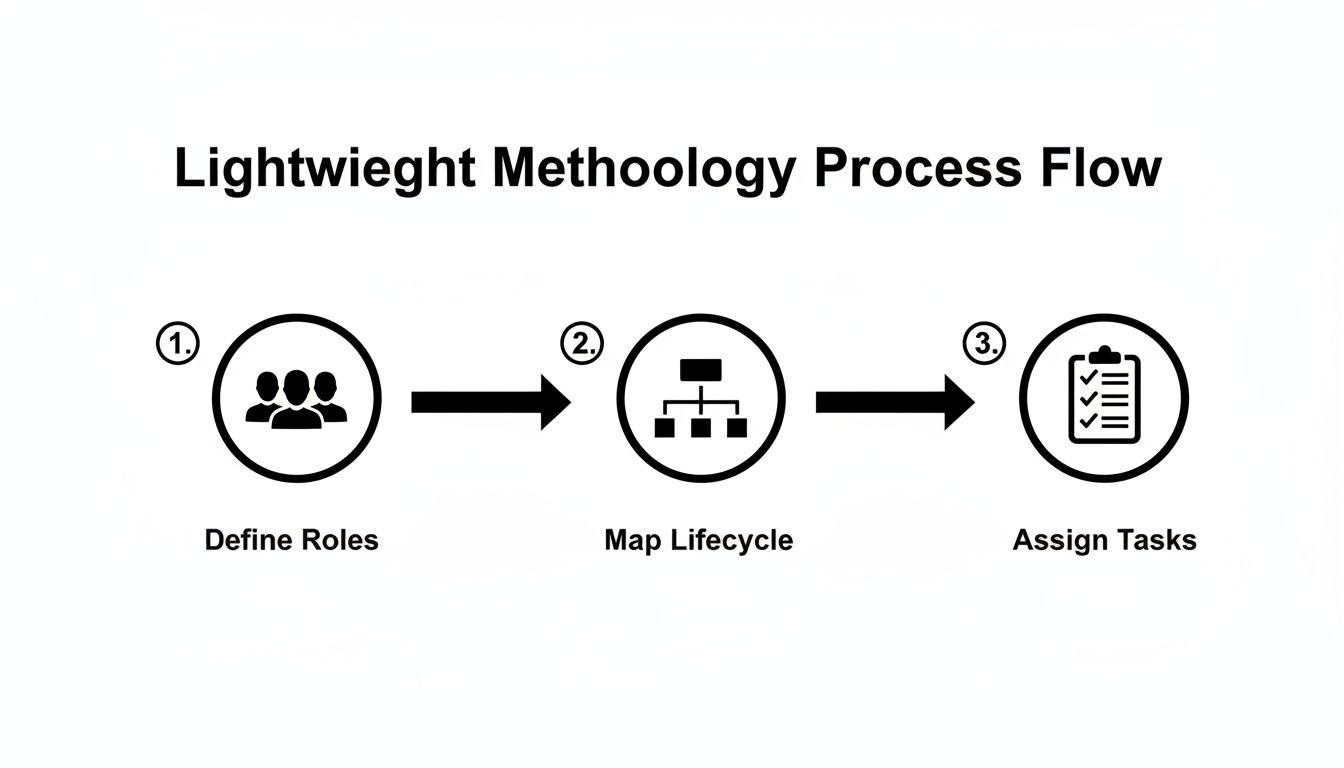
As you can see, a great system starts with people and process—defining roles, mapping the workflow, and then assigning tasks. The tool is always the last piece of the puzzle.
Crafting a Dynamic Project Tracker with Google Sheets
Google Sheets is the perfect place to start. Think of it less as a spreadsheet and more as a flexible dashboard for every project. The initial focus is on clarity, not complex formulas.
Action Step: Create a new sheet with these columns to build your master project tracker:
- Project Name: A clear title for the work.
- Client: Who the project is for.
- Project Lead: The one person responsible for keeping things moving.
- Status: A dropdown with options like 'Not Started,' 'In Progress,' 'On Hold,' and 'Completed.'
- Due Date: The final deadline.
- Link to Project Brief: A direct link to the Google Doc with all the details.
This master tracker gives you an instant, at-a-glance overview of your entire project portfolio. It answers the most common questions about workload and deadlines, which means fewer "just checking in" meetings.
Creating a Centralized Documentation Library
Disorganized files kill momentum. A project brief saved on one person's desktop or crucial feedback buried in an email thread is a recipe for chaos. A shared Google Drive folder and Google Docs solve this problem.
Action Step: For every new project in your tracker sheet, create a dedicated "Project Folder" in a shared drive. Inside that folder, create a Project Brief using a standardized Google Docs template. This document becomes the single source of truth for all critical project information.
A solid project brief template is a game-changer. It forces you to clarify objectives, scope, stakeholders, and success metrics upfront. Linking this doc directly from your master Google Sheet connects the high-level view with the on-the-ground details.
This simple habit creates an organized, searchable library that anyone on your team can access. As your business grows, understanding the principles behind a fully integrated project management system will give you a roadmap for what to build next.
Integrating Deadlines with a Shared Google Calendar
The last piece of your DIY project hub is making deadlines visible and actionable. Your Google Sheet logs the due dates, but a shared Google Calendar brings them to life.
Action Step: Create a new, dedicated "Projects Calendar" and share it with everyone on the team. For every major deadline or milestone from your tracker, add an event to this calendar. Be sure to invite the Project Lead and any other key players to the event.
This shared visual timeline helps everyone see what’s coming. They can plan their own work more effectively and flag potential bottlenecks before they become emergencies. By connecting your tracker, documents, and calendar, you've just built a robust, no-cost project management system perfectly suited for your small business.
Using Automation to Eliminate Administrative Drag
Administrative work is the silent killer of productivity. Time spent on manual status updates, follow-up emails, and report generation is time you're not spending on growing the business. This is the moment to evolve from a manual system to an intelligent, automated one.
Once your Google Workspace hub is running smoothly, you can identify the most repetitive tasks and hand them over to technology. Automation isn't about replacing people; it's about freeing up your best talent to solve real problems.
Pinpoint High-Impact Automation Opportunities
Start small. Don't try to automate an entire department overnight. Instead, look for the small, repetitive tasks that cause the most friction.
Think about the "if this happens, then I have to do that" moments in your workflow. Those are prime candidates.
- Weekly Status Reports: Are you spending an hour every Monday compiling updates? Set up a workflow to automatically pull data from your Google Sheet tracker and email a summary to key stakeholders.
- Client Follow-ups: An invoice is 3 days past due? An automated reminder can be sent without you ever checking your calendar.
- Task Handoffs: When a project's status changes to "Ready for Review," the next person in line can get an instant notification in your team's chat app.
Automation transforms your project management system from a passive record of work into an active participant. It handles the mundane tasks, ensuring consistency and freeing up your team's brainpower for creativity and strategy.
By targeting these administrative drags first, you build a more resilient and efficient foundation. A good business process automation checklist for SMBs can help guide your efforts.
Here are some of the simplest automations that have the biggest impact.
High-Impact Automation Opportunities for Small Businesses
| Manual Task | Automated Workflow Solution | Key Benefit |
|---|---|---|
| Chasing down project status updates | Automated daily/weekly digest email from a central tracker. | Frees up manager's time; provides consistent updates. |
| Manually creating and sending invoices | Triggering invoice generation from a project management tool. | Speeds up cash flow; reduces human error. |
| Onboarding new clients or employees | Kicking off a checklist of tasks when a new contact is added. | Ensures a consistent, professional experience every time. |
| Reminding the team about deadlines | Automatic alerts in a chat app (like Google Chat) 24 hours before a due date. | Reduces missed deadlines; keeps accountability high. |
These are just starting points, but you can see how taking just one of these off someone's plate can make a real difference.
Automation in Action: A Consulting Firm Example
I worked with a small consulting firm that was drowning in manual invoicing and milestone updates. The COO was spending hours every week cross-referencing timesheets, drafting invoices in Word, and emailing clients about project progress.
We set up a simple automation workflow that changed everything.
- Automated Invoicing: When a project milestone is marked "Complete" in their Google Sheet tracker, a workflow automatically generates a professional invoice using a Google Doc template.
- Smart Notifications: At the same time, an email is sent to the client with the invoice attached and a brief, personalized update.
- Internal Alerts: The finance lead gets a notification that a new invoice has been sent, so they can track payments without chasing down the COO.
This one change saved the COO nearly a full day of administrative work every month. It also improved their cash flow because invoices went out the moment work was finished. This is a perfect example of how targeted project management for small business can directly boost the bottom line.
If you want to dig deeper into this, check out our guide on how automation can benefit small businesses.
Measuring Success and Avoiding Common Pitfalls
Setting up a project management system is a great first step, but how do you know if it's actually working? A system is only as good as the results it produces. You need a straightforward way to track what's moving the needle and what's just creating busywork. This isn't about getting bogged down in reports; it's about keeping a simple pulse on your operational health.
To get a true picture of the value you're creating, solid AI automation ROI tracking is a game-changer. It helps you draw a straight line from your process improvements to tangible business outcomes, proving your efforts are paying off.
Key Metrics to Track Your Progress
Forget vanity metrics. For effective project management for small business, focus on numbers that reflect genuine efficiency and happy clients. These metrics give you an honest snapshot of your performance without burying your team in administrative tasks.
Here are three powerful indicators to start tracking:
- Cycle Time: How long does it take for a task to get from "To-Do" to "Done"? A shrinking cycle time is a clear sign your process is becoming more efficient. If that number starts to creep up, it’s a red flag that you have a bottleneck.
- Budget Variance: Are your projects consistently on target, or are they always going over budget? This single number tells you a lot about the accuracy of your planning and estimation.
- Client Satisfaction: A quick Net Promoter Score (NPS) survey or a short feedback form after a project can tell you more than any internal report. Happy clients are the ultimate proof of a process that works.
The point of measuring isn't to create more work. It’s to get the insights you need to keep improving. You're building a resilient operational foundation that can support your business as it grows.
Dodging Common Small Business Traps
I've seen many small businesses stumble when they first try to formalize their project management. The good news is they almost always fall into the same predictable traps. Just knowing what they are is half the battle.
- Mistake #1: Choosing the Tool Before the Process. No software, no matter how flashy, can fix a broken process. First, map out how your team actually gets work done. Then, find a tool that fits that reality.
- Mistake #2: Over-engineering From Day One. You don't need a ten-column Kanban board or complex dependency mapping at the start. Begin with the absolute minimum number of steps. You can add complexity later, but only when there’s a clear reason to do so. Simplicity drives adoption; complexity creates resistance.
- Mistake #3: Forgetting Team Buy-in. Any new system is doomed if your team doesn't see how it makes their jobs easier. Involve them in the design process, listen to their feedback, and lead by example. If the leadership team isn’t using the system, no one else will.
Frequently Asked Questions
When you're trying to get a handle on project management in a small business, a lot of questions pop up. Here are the most common ones we hear, with straight-up advice.
What's the Easiest Project Management Method for a Small Team?
For most small teams, a Kanban board is the perfect place to start. Use simple columns like 'To-Do', 'In Progress', and 'Done'.
It's brilliantly simple because it doesn't bog you down with complicated rituals or formal roles. You get an instant visual snapshot of who’s working on what and where things are getting stuck. For teams that need to get things done without a lot of process overhead, it’s a game-changer.
The best methodology is the one your team will actually use. Kanban's simplicity and visual nature make it incredibly practical. It's all about creating clarity and flow, not more busywork.
Do We Really Need to Buy Project Management Software?
Not right away. You can get surprisingly far with the tools you're probably already paying for, like Google Workspace or Microsoft 365. The trick is to define your process first. Figure out how you want to plan, execute, and review work.
Once that manual process is working smoothly, you'll know exactly where a dedicated tool could make a real difference. Starting with the process—not the software—saves you from buying a tool you don't need to solve a problem you don't actually have.
How Can I Get My Team to Actually Stick to the New Process?
Team adoption comes down to two things: involvement and value. If you want your team to use the new system, bring them into the process of creating it. More importantly, show them how it makes their jobs easier, not harder.
Start by tackling their biggest headaches, like unclear priorities or constant interruptions. Build the process to solve that.
Keep it simple and lead by example. If the leadership team uses the new system for every single update, everyone else will follow. Frame it as a way to cut down on confusion and kill pointless meetings—not as a way to micromanage. They need to see what’s in it for them, which is almost always more focus time and less chaos.
At OpsHub, we build and run custom, AI-powered workflows that get rid of the administrative headaches holding small businesses back. We help you turn operational friction into your biggest advantage.
Learn how OpsHub can build a custom system for your business
Share This Story, Choose Your Platform!
TUNE IN

OpsHub Signal publishes analysis, essays, and field notes on operations, capital, policy, and systems design. Subscribe to receive a weekly briefing that cuts through noise and delivers what actually matters to operators.